


Automate Stripe Payment Notifications with D7 SMS and Make.com
Simplify your payment process with automated SMS receipts, instant Slack notifications, and seamless Google Sheets logging all powered by Make.com.
Introduction
For developers and SaaS teams, efficient automation can make the difference between manual chaos and smooth operations. With Make.com , formerly Integromat, you can build robust workflows that connect your favorite apps without writing a single line of code. This specialized Make.com workflow integrates Stripe , D7 SMS , Google Sheets , and Slack to help your team streamline post-payment communications.
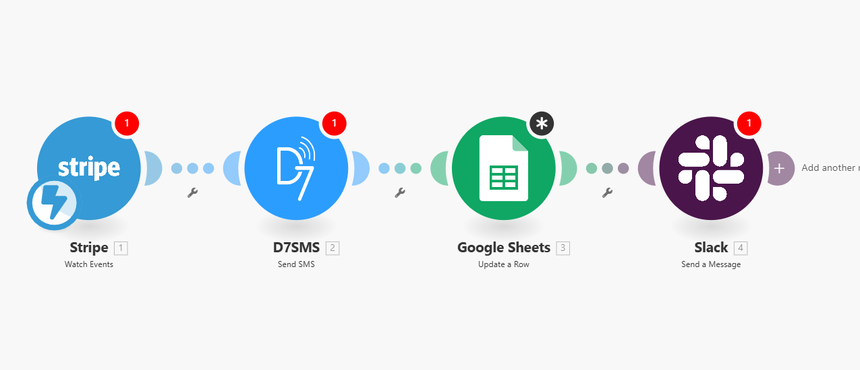
When a new payment arrives in Stripe , Make.com instantly triggers a set of actions:
- Sends an automatic payment receipt SMS via D7 SMS integration.
- Logs the transaction details in Google Sheets for easy tracking.
- Notifies your finance team on Slack in real time.
How It Works
This Make.com automation scenario is built on a simple but powerful event-driven flow:
1. Trigger — Stripe: New Payment Received
The workflow begins when a new successful payment is registered in your Stripe account. Make.com listens for payment events through Stripe’s API, ensuring every transaction is captured immediately.
2. Action — D7 SMS: Send Payment Receipt
After detecting a new payment, Make.com calls the D7 SMS service to deliver a personalized SMS receipt to your customer. By using the dynamic data from Stripe such as customer name, payment amount, and transaction ID you can provide customers with instant confirmation and professional communication.
3. Action — Google Sheets: Log Payment Details
The next step ensures all transactions are documented. Make.com records each payment’s metadata (like amount, date, and customer email) into a structured worksheet in Google Sheets. This provides your finance team with a real-time ledger that can be easily filtered, sorted, or integrated with other reporting tools.
4. Action — Slack: Notify Finance Team
Finally, the automation sends a Slack notification to your finance or operations channel. The message can include key details from the Stripe payment, allowing your internal team to stay informed of incoming revenue without logging into multiple systems.
Each step executes seamlessly within your Make.com scenario, resulting in an automated feedback loop that improves efficiency, reduces manual entry, and enhances visibility across departments.
Key Benefits
Implementing this Stripe–D7 SMS–Google Sheets–Slack Make.com workflow comes with several clear advantages:
- Instant Communication : With D7 SMS integration , customers receive immediate payment confirmations improving trust and reducing support inquiries.
- Accurate Record-Keeping : Automatically log every incoming payment in Google Sheets , ensuring your transaction history is always up-to-date.
- Team Transparency : Real-time Slack alerts keep your finance and management teams in sync, making reconciliation and reporting effortless.
- Reduced Manual Workload : No more copying data between apps or manually sending confirmations. Let Make.com handle repetitive tasks so your team can focus on high-value projects.
- Developer-Friendly Customization : Make.com provides a visual scenario builder and advanced logic tools. Define conditions, handle exceptions, and scale workflows without complex coding.
- Scalable & Secure : Make.com integrates securely with Stripe’s APIs, ensuring sensitive payment data is handled according to industry standards.
This automation helps developers and operations professionals maintain consistency, reduce errors, and provide a better customer experience all through streamlined integration.
Practical Use Cases
This automation scenario suits multiple business environments where real-time payments and notifications are essential:
- SaaS Billing Cycles : Send instant payment confirmations when subscriptions or renewals are processed through Stripe.
- E-commerce Transactions : Automatically notify customers of order confirmations and log orders for fulfillment tracking.
- Event Registration Systems : Send SMS tickets or confirmations immediately after payment, simplifying customer communication.
- Freelancers and Agencies : Use the workflow to record revenue streams, keep transparent records, and update your finance team automatically.
- Nonprofits and Fundraising : Keep donors informed with SMS acknowledgments while logging contributions in a centralized spreadsheet.
By combining Stripe, D7 SMS, Google Sheets, and Slack through Make.com automation , these use cases help organizations maintain professionalism, accuracy, and responsiveness at scale.
Get Started
Building this scenario is straightforward even for developers who need reliable automation without extensive coding effort.
- Sign in to Make.com and create a new scenario.
- Add Stripe as the trigger module and select the “New Payment Received” event.
- Connect D7 SMS integration to send dynamic message templates based on Stripe data.
- Add a Google Sheets module to append transaction rows in your spreadsheet.
- Use Slack as your final action to post a payment summary in your team channel.
- Test the workflow to ensure each module executes correctly, then schedule it to run continuously.
Once live, you’ll have a fully automated payment notification system that enhances your operational efficiency from the moment a new Stripe payment is received.
