Order Status Messages on WhatsApp: Utility Messages, Automation Examples, and Winning Strategies
You placed an order. You got a confirmation email, buried under twelve promotional messages by the time you check. Two days pass. Nothing. You head to the website, dig through "Track My Order," copy-paste a reference number, and still get a vague "In transit" response. At some point, you're just guessing whether your package even exists.
This is the experience most customers still have. And it's completely avoidable.
More businesses are realising that the gap between placing an order and receiving it is one of the most under-optimised parts of the customer journey. WhatsApp, the app most of your customers already have open dozens of times a day, is quietly becoming the most effective channel to close that gap.
What Are Order Status Messages on WhatsApp?
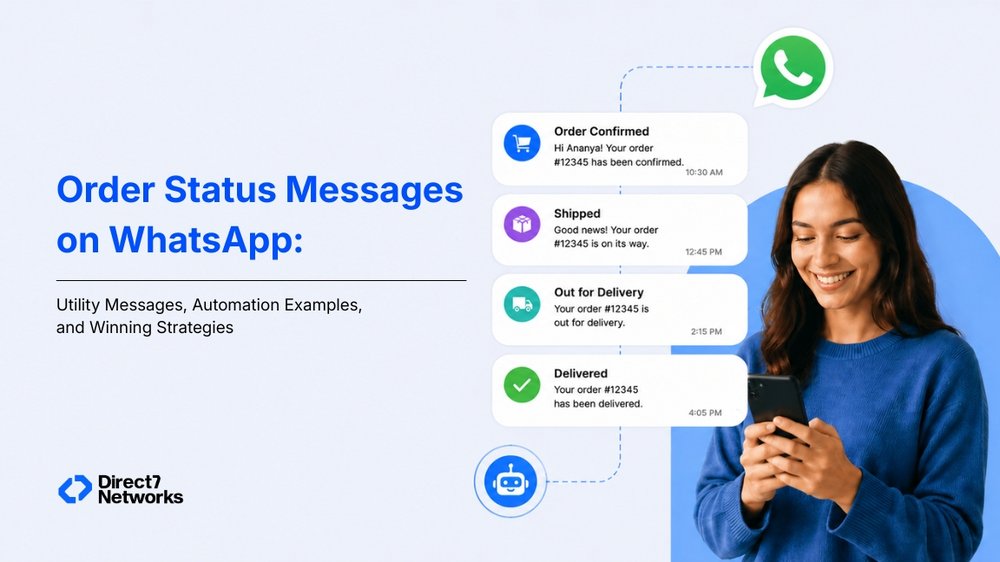
Order status messages on WhatsApp are automated notifications sent to customers at key stages of the purchase and fulfilment process, from the moment an order is confirmed to the moment it lands at the door.
These aren't marketing messages. They're practical, transactional updates: your order is confirmed, your payment went through, your parcel is on its way, your delivery arrived. Simple, timely, expected.
What makes WhatsApp different from email or SMS here is context. Customers read WhatsApp messages. The average open rate for WhatsApp messages sits well above 90%, compared to email open rates that hover around 20–30%. When you send an update on WhatsApp, there's a very high chance it actually gets seen, almost immediately.
For operations and customer experience teams, that means fewer "Where is my order?" calls flooding support queues. For customers, it means less anxiety and more trust.
WhatsApp Utility Messages: The Category That Matters Most
Within the WhatsApp Business Platform, transactional notifications fall under a specific category called utility messages. These are conversations your business initiates with customers to keep them informed during and after a purchase, not to sell them something, but to deliver information they're genuinely waiting for.
Utility messages include:
- Order confirmations - Acknowledging the purchase immediately after checkout
- Payment confirmations - Confirming that a transaction was successful
- Shipping updates - Notifying customers when an order has been dispatched
- Out-for-delivery alerts - Letting customers know the delivery is happening today
- Delivery confirmations - Closing the loop once the order has arrived
- Return and refund updates - Keeping customers informed if something goes wrong
This category also includes appointment reminders, subscription renewals, and post-purchase feedback requests, anything that provides "critical, time-sensitive information to customers" during an active transaction.
Why they matter
Utility messages do more than just inform:
- They reduce uncertainty after purchase
- They prevent unnecessary support queries
- They create a sense of reliability
- They reinforce your brand as responsive and transparent
For e-commerce, logistics, and service platforms, this is the backbone of WhatsApp customer communication.
Automated WhatsApp Message Examples for Order Updates
The quality of your message matters as much as the timing. A generic "Your order has shipped" is technically useful but forgettable. A well-crafted message builds trust, reduces anxiety, and can even prompt action.
Here are practical templates you can adapt:
1. Order Confirmation
Hi {{Customer Name}} Your order #{{Order ID}} has been confirmed!
🛍️ Items: {{Product Summary}} 💰 Total: {{Amount}} 📦 Estimated delivery: {{Date Range}}
We'll send you an update when your order ships. Questions? Reply here anytime.
2. Shipping Update
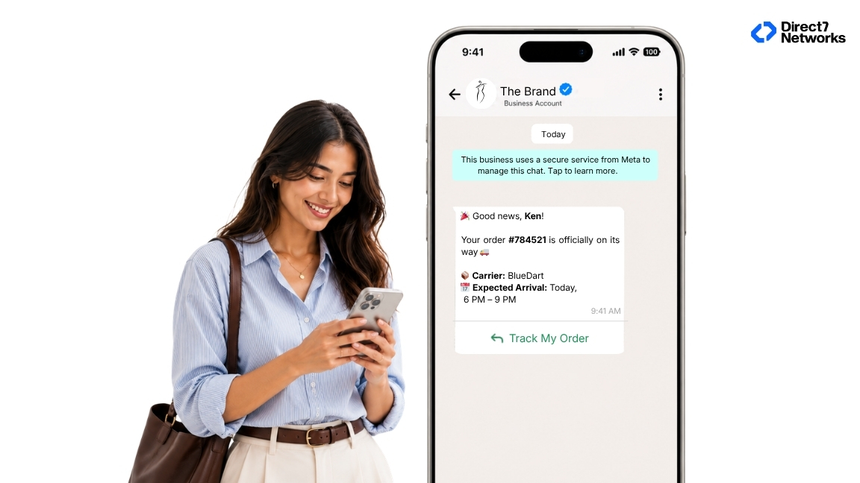
Good news, {{Customer Name}}! 🚚 Your order #{{Order ID}} is on its way.
Carrier: {{Courier Name}} Tracking: {{Tracking Link}}
Expected arrival: {{Delivery Date}} [Track My Order] ← quick reply button
3. Out-for-Delivery Alert
Your order is almost there, {{Customer Name}}! 📦 Your delivery is scheduled for today between {{Time Window}}.
Someone will need to be available to receive it. [I'll Be Home] [Reschedule Delivery] ← quick reply buttons
4. Delivery Confirmation
Delivered! ✅ Hi {{Customer Name}}, your order #{{Order ID}} was delivered at {{Time}}.
Enjoying your purchase? We'd love to hear from you. [Leave Feedback] [Need Help?] ← quick reply buttons
Notice the consistent pattern: personalisation, clear facts, one action if needed. No filler, no marketing language. These messages work because they match exactly what the customer wants to know at that moment.
Winning Strategies for WhatsApp Order Notifications
Sending messages is easy. Sending the right messages, that’s where businesses stand out.
1.Personalization that feels natural
Customers don’t want robotic updates.
Use:
- Names
- Order details
- Relevant timelines
Instead of:
“Your order has shipped”
Try:
“Hi Rahul, your sneakers are on the way and should reach you by Friday.”
Small difference, big impact.
2. Timing matters more than frequency
Too many messages feel spammy. Too few create anxiety.
The sweet spot:
- Send updates only when something changes
- Avoid duplicate notifications
- Deliver messages instantly when triggered
Real-time delivery is what makes WhatsApp order notifications effective.
3. Add interactive elements
WhatsApp isn’t just for one-way communication.
Use:
- “Track Order” buttons
- “Contact Support” quick replies
- “Reschedule Delivery” options
This reduces friction and improves customer control.
4. Keep messages clear and concise
Customers scan messages quickly.
Best practices:
- One purpose per message
- Short sentences
- Clear call-to-action
Avoid clutter. If customers need to read twice, it’s too long.
5. Connect WhatsApp with your systems
The real value comes from integration.
When your WhatsApp API is connected to:
- Order management systems
- CRM platforms
- Logistics tools
Messages become automatic and accurate.
Platforms like Direct77 Networks enable businesses to integrate WhatsApp API for eCommerce, ensuring messages are triggered instantly based on real events.
3 Steps to Automate Order Messaging Before Seasonal Sales
Peak periods, festive seasons, flash sales, major product launches are when your order volume spikes and your support team feels the pressure most. Getting automation in place before that happens is what separates businesses that scale smoothly from those that scramble.
Step 1: Build and approve your message templates
WhatsApp requires pre-approved, templated messages. Start by mapping the key order milestones you want to cover, then write clear, compliant templates for each. Submit them through your WhatsApp Business Solution Provider (BSP),providers like D7 Networks can help manage this process well before your busy period, as approval can take a few days.
Step 2: Integrate your WhatsApp API with your order management system or CRM
Templates alone don't send themselves. You need a trigger,an event in your order system (order placed, status changed to "shipped," delivery confirmed) that fires the right WhatsApp message automatically. Connecting your WhatsApp Business API to your eCommerce platform or CRM through an integration tool allows you to define these triggers once and let automation handle the rest. Most platforms Shopify, WooCommerce, Salesforce have native connectors or webhook support for this.
Step 3: Test your workflows and build in fallbacks
Before you scale, test every flow end-to-end with real orders in a staging environment. Check that variables populate correctly, buttons work, and responses route to the right place. Build in fallbacks for edge cases what happens if a delivery is delayed, or if a customer message comes in after hours? Define those paths before peak season, not during it.