
Webhook Integration in WhatsApp Chatbot Builder: Why It Changes Everything for Automation Teams
Learn how WhatsApp chatbot webhook integration connects CRM platforms, APIs, order tracking, customer databases, and business systems to automate workflows and deliver real-time customer experiences.
For a long time, chatbot builders solved only part of the automation problem.
You could create conversation flows, send automated replies, collect user input, and route conversations based on predefined conditions. That worked well for FAQs, lead capture, appointment reminders, and simple customer support.
But the moment businesses wanted the chatbot to do something dynamic — check an order status, fetch loyalty points, validate a customer ID, trigger a CRM workflow, or pull live inventory, teams often hit a wall.
That’s where webhook integration changes the game.
Webhook support inside a WhatsApp chatbot builder allows businesses to connect external systems directly into chatbot conversations. Instead of keeping the bot isolated, it becomes part of the company’s operational ecosystem.
This is one of the most requested improvements in chatbot platforms for a reason: businesses no longer want static automation. They want connected automation.
What webhook integration actually means in a chatbot flow
A webhook is essentially a bridge between systems.
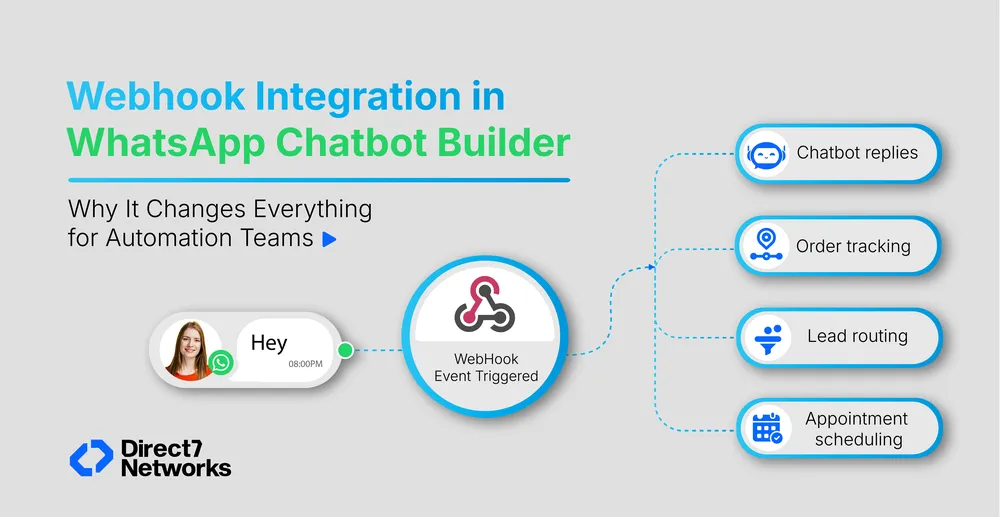
Inside a chatbot flow, the webhook can send data from the conversation to another platform and receive a response in real time.
That response can then shape the conversation instantly.
For example:
- A customer enters an order ID
- The chatbot sends that ID to an order management system through a webhook
- The external system returns delivery details
- The chatbot replies with the latest shipment status
The customer experiences it as one smooth conversation.
Behind the scenes, multiple systems are communicating in seconds.
Without webhook support, chatbot builders are usually limited to predefined logic. With webhook integration, the chatbot can work with live data, personalized information, and external business processes.
Why were businesses demanding this feature
Many companies adopted WhatsApp automation expecting end-to-end workflows.
Instead, they discovered that most chatbot builders handled only the front-end conversation layer.
Teams still had to manually:
- Check backend systems
- Update CRMs
- Trigger operational workflows
- Verify customer information
- Send collected data to internal tools
That created operational gaps.
Webhook integration removes much of that friction because the chatbot can now act as an intelligent connector between customer conversations and backend systems.
This matters especially for:
- E-commerce businesses
- Logistics companies
- Healthcare providers
- Financial services
- SaaS platforms
- Customer support teams
These industries rely heavily on real-time data.
A chatbot that cannot access live systems eventually becomes limited.
Real Scenarios, Not Just Theory
Order and Delivery Tracking on WhatsApp
A customer sends their order ID. The webhook queries your logistics system and returns the live status. The bot replies with accurate tracking information in the same message thread, no agent required, no redirect to your website.
CRM Sync at the End of a Lead Flow
Your chatbot qualifies a lead through a short conversational flow on WhatsApp. The moment the customer finishes, a webhook pushes their details name, number, responses, directly into HubSpot, Salesforce, Zoho, or whichever CRM your team uses. No morning data entry, no delay.
Conversations Personalised by Live Account Data
Before the bot asks a single question, a webhook checks your backend to identify the customer, their plan, purchase history, open support tickets. Premium customers get routed differently from new ones. The experience feels tailored because it's using real data from your systems.
Booking Confirmations and Payment Triggers
A customer completes a booking flow on WhatsApp. At confirmation, a webhook fires to your scheduling or payment system, creates the record, and the bot delivers a confirmation number or payment link in the next message. The whole interaction stays in WhatsApp.
What teams should consider before implementing webhooks
Webhook integration is powerful, but planning matters.
Before deployment, teams should define:
- Which systems need connectivity
- What customer data is required
- How failures should be handled
- What security measures are necessary
- Which workflows deserve automation first
Not every process needs real-time integration immediately.
The best implementations usually start with one high-impact workflow:
- Order tracking
- Lead routing
- Appointment scheduling
- Customer verification
Then expand gradually.
How It's Built Into the D7 Flow Builder
Inside the D7 chatbot builder, you'll find a webhook node you can drop into your flow at any point. Configure the endpoint URL, select GET or POST, and map which conversation variables get sent in the request phone number, customer input, product ID, whatever your external system needs.
When the response comes back, you can use it two ways: display it as part of the bot's reply, or use it to branch the conversation. That second option, response-based routing is where most of the practical power sits. A successful API response takes the customer one way; an error or unexpected result takes them another. You define both paths in the builder, using the same interface you already know.
Set It Up Without Breaking Things
A few things that make the difference between a webhook that works well and one that causes problems:
Handle errors before you handle success. Decide what the bot says when the webhook fails or times out before you design the happy path. On WhatsApp, customers expect smooth, instant responses, a flow that silently breaks is a bad experience.
Only send what the external system actually needs. Map out the required variables before you start building. Passing unnecessary data creates complexity and potential compliance concerns.
Test against a dummy endpoint first. Before pointing your webhook at a live CRM or production system, use a test URL to verify the exact payload your chatbot sends. Ten minutes here prevents hours of debugging later.
Match timing to importance. A new lead or a support escalation should fire immediately. Low-priority data like conversation transcripts can be handled with a delay or batched. Not every webhook needs to be real-time.
Where to Start
Webhook integration sounds broad, but the best first use is always specific. Look at your current WhatsApp chatbot flow and find the one step where a human today takes data from the conversation and manually enters it somewhere else, a CRM, a spreadsheet, a helpdesk. Build the webhook for that step first.
That single integration usually changes how your whole team thinks about what the chatbot can handle. And from there, the next one tends to be obvious.
The feature is live in your D7 dashboard. If you need a hand configuring your first webhook or want to talk through a specific use case, the D7 support team is available to help.
The bigger takeaway
Webhook integration solves one of the biggest limitations businesses faced with chatbot automation: disconnected systems.
It transforms WhatsApp chatbot builders from static conversation tools into dynamic automation platforms capable of handling real operational tasks.
For customer support, sales, marketing, and operations teams, that means faster workflows, better customer experiences, and fewer manual processes.
The real value is not just automation.
It’s connected automation.