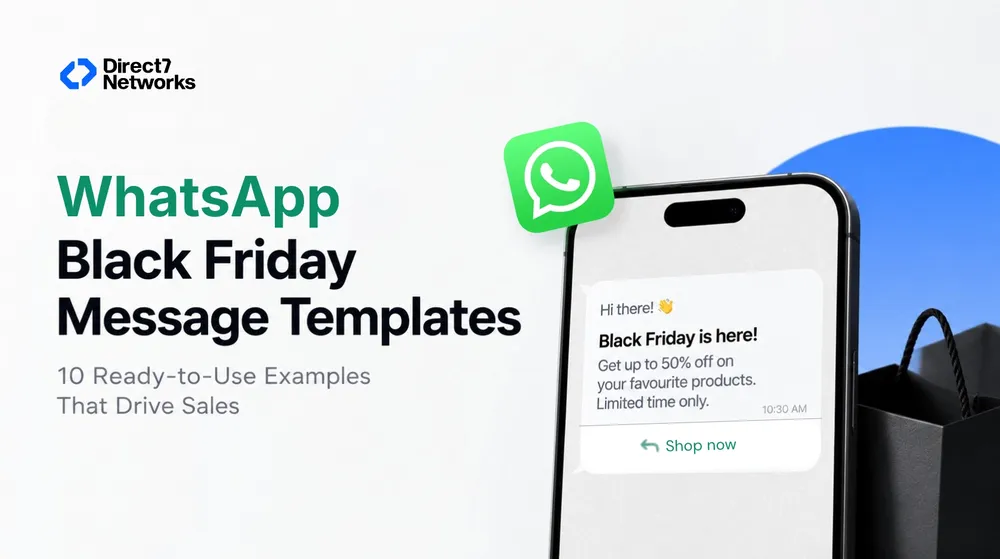

WhatsApp Black Friday Message Templates: 10 Ready-to-Use Examples That Drive Sales
Copy-ready WhatsApp Black Friday message templates for offers, carousels, countdowns, abandoned carts and order updates. Learn how to send them via API.
Black Friday is the biggest shopping moment of the year, and your customers' inboxes are crowded. Emails get buried. Ads get skipped. WhatsApp, on the other hand, is where people already talk to friends and family, which is why messages sent there get noticed.
But a strong channel is not enough. The message template you send decides whether a customer taps your offer or ignores it.
In this guide you'll find WhatsApp Black Friday message templates for every stage of the sale: the teaser, the launch, the countdown, the abandoned cart, the order update and the verification step. You'll also learn which WhatsApp template type fits each goal and how to send them at scale through the WhatsApp Business API.
Why Use WhatsApp for Black Friday Campaigns?
Black Friday 2026 falls on 27 November, with Cyber Monday following on 30 November. Here is why WhatsApp deserves a place in your plan:
- High visibility: Messages land in a personal chat, not a promotions tab.
- Rich formats: Images, videos, GIFs, documents, carousels and buttons make offers visual and tappable.
- Two-way conversation: Customers can reply, ask about stock or sizes, and get answers instantly through a chatbot.
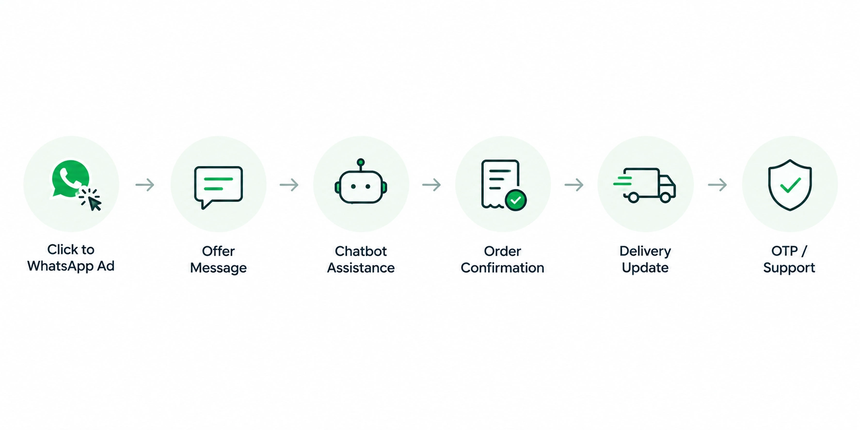
- Full-journey coverage: One channel handles promotion, order confirmation, delivery updates, support and login verification.
First, Understand WhatsApp Template Categories
WhatsApp requires businesses to use pre-approved message templates when starting a conversation with a customer. Templates fall into categories, and for Black Friday you will use four:
| Category | Black Friday use |
|---|---|
| Marketing | Offers, early access, countdowns, product launches |
| Utility | Order confirmations, payment and delivery updates |
| Service | Replies to customer questions and support requests |
| Authentication | OTPs for login, checkout and account verification |
Plan templates early. Approval takes time, and you don't want your best offer stuck in review on the morning of the sale.
Which WhatsApp Template Type Should You Use?
- Concept: Five cards in a row labelled Custom, Carousel, Limited-Time Offer, Flow, Chatbot, each with a small icon and one-line use case.
- Alt text: Infographic of WhatsApp marketing template types for Black Friday campaigns
- AI image prompt: Clean infographic with five rounded cards in WhatsApp green and white, simple line icons for text message, carousel, countdown timer, form flow and chatbot, minimal labels, light background
1. Custom Marketing Templates
The all-rounder. The header can be text, image, video, document or location. The body is mandatory, and every variable in it must match the approved template. You can add Quick Reply, Call to Action and Copy Code buttons. Ideal for teasers, launch announcements and discount-code drops.
2. Carousel Templates
Send one message with up to 10 scrollable cards. Each card needs a media header (image or video), body text and at least one button (up to two). The media format and button types must be consistent across all cards. Ideal for showcasing multiple deals in one message.
3. Limited-Time Offer Templates
Show an expiry date and a running countdown timer for an offer code. Perfect for flash sales, with a few rules to remember: only MARKETING-category templates are supported, footer components are not supported, and customers viewing on WhatsApp Web or desktop will see a "not supported" notice instead of the offer.
4. Flow Templates
Guide customers through steps and choices inside WhatsApp, such as picking a gift category, entering preferences or qualifying for a deal. Flows must be in Published state before you attach them to a template, and not every user's app version may support them.
5. Chatbot Journeys
Pair templates with a WhatsApp chatbot to automate abandoned-cart reminders, product recommendations and instant answers while your team handles the rush.
10 WhatsApp Black Friday Message Templates (Copy and Customize)
Replace the {{variables}} with your own details. Keep the tone short, specific and benefit-led.
Template 1: The Teaser (Pre-Sale Hype)
Type: Marketing, Custom (image header)
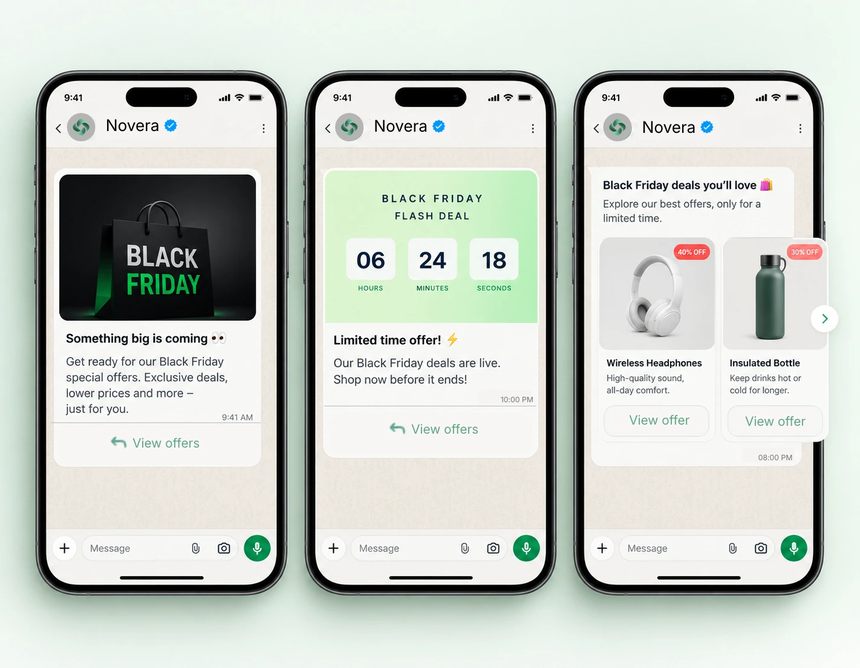
Hi {{1}}, something big is coming. 👀 Our Black Friday sale starts on {{2}}. Get early access before everyone else.
Buttons: [Get Early Access] [Remind Me]
Template 2: VIP Early Access
Type: Marketing, Custom
Hi {{1}}, you're on our VIP list. 🎉 Shop our Black Friday deals 24 hours early with code {{2}}.
Buttons: [Shop Now] [Copy Code]
Template 3: Sale Launch Announcement
Type: Marketing, Custom (video or image header)
It's here! Our Black Friday sale is live. 🔥 Up to {{1}}% off on {{2}}. Offer ends {{3}}.
Buttons: [Shop the Sale] [View Top Deals]
Template 4: Flash Sale Countdown
Type: Marketing, Limited-Time Offer
⏳ Flash deal for you, {{1}}! Get {{2}} off with code {{3}}. The timer is running.
Button: [Claim Offer]
Remember: no footer on this template type, and desktop viewers won't see the offer.
Template 5: Top Deals Carousel
Type: Marketing, Carousel (up to 10 cards)
Hi {{1}}, our best Black Friday picks, just for you. Swipe to explore. 👉
Each card: product image, short title and price, one [Buy Now] button
Template 6: Abandoned Cart Reminder
Type: Marketing, Custom, triggered by chatbot or cart event
Hi {{1}}, you left something behind. 🛒 Your {{2}} is still in your cart, and Black Friday pricing ends {{3}}.
Buttons: [Complete My Order] [Need Help?]
Template 7: Personalized Gift Finder
Type: Marketing, Flow Template
Hi {{1}}, need help finding the perfect gift? 🎁 Answer 3 quick questions and we'll suggest the best Black Friday deals.
Button: [Find My Gift]
Template 8: Order Confirmation
Type: Utility
Thanks for your order, {{1}}! ✅ Order {{2}} is confirmed. Estimated delivery: {{3}}.
Button: [Track Order]
Template 9: Delivery and Delay Update
Type: Utility
Hi {{1}}, your order {{2}} is on its way. 🚚 Black Friday volumes are high, so thanks for your patience. Expected arrival: {{3}}.
Button: [Track Shipment]
Template 10: Secure Checkout OTP
Type: Authentication
{{1}} is your verification code. For your security, do not share this code.
Button: [Copy Code]
Make Your Campaigns Perform Better with the Marketing Messages API
Templates are the content. Delivery is the engine. The Marketing Messages API for WhatsApp is built to send marketing messages with delivery optimization, aiming to reach more of the people most likely to find them relevant. In Meta's testing, this approach drove more reads and clicks.
Benefits for your Black Friday campaigns:
- Delivery optimization to reach people most likely to engage
- Performance benchmarks so you can compare results with similar businesses
- Tailored recommendations to improve campaigns while the sale is running
- Richer media, including GIFs
- Message time-to-live (TTL) so a time-sensitive offer is not delivered hours after it expires
- Automatic creative optimizations (in testing), such as image animation and filtering
TTL matters most on Black Friday. A "ends tonight" message that arrives tomorrow hurts trust.
Beyond Promotions: Support the Whole Shopping Journey
Successful Black Friday campaigns do not stop at the offer.
Utility Messaging
Order confirmations, payment receipts and shipping updates reduce "where is my order?" tickets during peak volume.
Service Messaging and Chatbots
Customers will ask about stock, sizes, returns and delivery. A WhatsApp chatbot answers instantly and hands over to an agent when needed, so your support team isn't overwhelmed.
Authentication Messaging
Shoppers log in, reset passwords and confirm payments at speed. A slow OTP means a lost sale. Using a verification API with multiple channels and a fallback system means that if a code doesn't arrive on one channel, it automatically goes through another, keeping checkout smooth.
Click to WhatsApp Ads
Send traffic from ads straight into a WhatsApp conversation, where a chatbot or agent can answer questions and close the sale while interest is high.
Get Ready in Time: WhatsApp Business API Onboarding
With Black Friday on 27 November, the safest time to onboard is now. You can't send a single template until your WhatsApp Business API account is live, and your templates must be approved before they can go out. Starting early leaves room for template reviews, testing and fixes.
Registering your business with Meta can feel technical, and D7 Networks simplifies it. Here is what you need before you start and the steps to follow.
Prerequisites
- A valid mobile number: It must not be active on WhatsApp.
- A Facebook Page: You must own it or have admin access to it.
6 Steps to Onboard to the WhatsApp Business API with D7
1. Create or log in to your D7 account.
2. Start the WhatsApp setup.
3. Add your number and complete OTP verification.
4. Complete account verification with Meta.
5. Add payment methods and recharge your account.
6. Create templates and start your campaign.
Note: We highly recommend getting help from the D7 support team for steps 4 and 5 (Meta account verification and payment setup).
Follow these steps and you can integrate the WhatsApp Business API into your communication strategy, improve customer interactions and drive business growth.
Don't Forget Customer Onboarding: Opt-In and Welcome Messages
Onboarding isn't only about your business account. Customers need to say yes to hearing from you on WhatsApp, and Black Friday is a great moment to collect those opt-ins.
- Collect opt-ins before the sale: Add a WhatsApp sign-up option on your website, checkout page, order confirmation page and email footer. Offer a clear reason, such as early access to Black Friday deals.
- Be transparent: Tell customers what messages they'll receive and how often, and let them opt out easily.
- Welcome them straight away: Confirm the sign-up with a short message that sets expectations and delivers value immediately.
Template 11: Opt-In Welcome Message
Type: Utility or Marketing, depending on content (check the category before submitting)
Welcome, {{1}}! 🎉 You're now on our WhatsApp list. Expect early access to Black Friday deals and order updates here. Reply STOP anytime to opt out.
Buttons: [See Early Deals] [Manage Preferences]
Pair this with a chatbot that can answer first questions, such as "What deals are coming?", so new subscribers get a response in seconds.
Black Friday WhatsApp Campaign Checklist
- Submit all templates for approval at least 2 weeks before the sale
- Collect and confirm opt-ins before you message anyone
- Segment your audience: VIPs, past buyers, cart abandoners
- Use a clear offer, a deadline and one primary button per message
- Set TTL on time-sensitive offers
- Schedule messages across the weekend instead of one big blast
- Prepare chatbot flows for stock, shipping and returns questions
- Test every template on mobile before launch
- Track reads, clicks and conversions, then adjust mid-campaign
Common Mistakes to Avoid
- Messaging without opt-in. This hurts quality ratings and trust.
- Too many messages. Two or three well-timed messages beat ten.
- Vague offers. "Big discounts" loses to "30% off sneakers until midnight."
- Ignoring template limits. Remember the no-footer rule and desktop limitations for limited-time offer templates.
- No plan for replies. Promotions create conversations. Be ready to answer them.
Launch Your Black Friday WhatsApp Campaign with D7
D7 Networks is a Meta-verified WhatsApp Business API provider. With D7 you can create templates, send marketing campaigns, build chatbots and secure checkout with multi-channel verification, all through one platform.