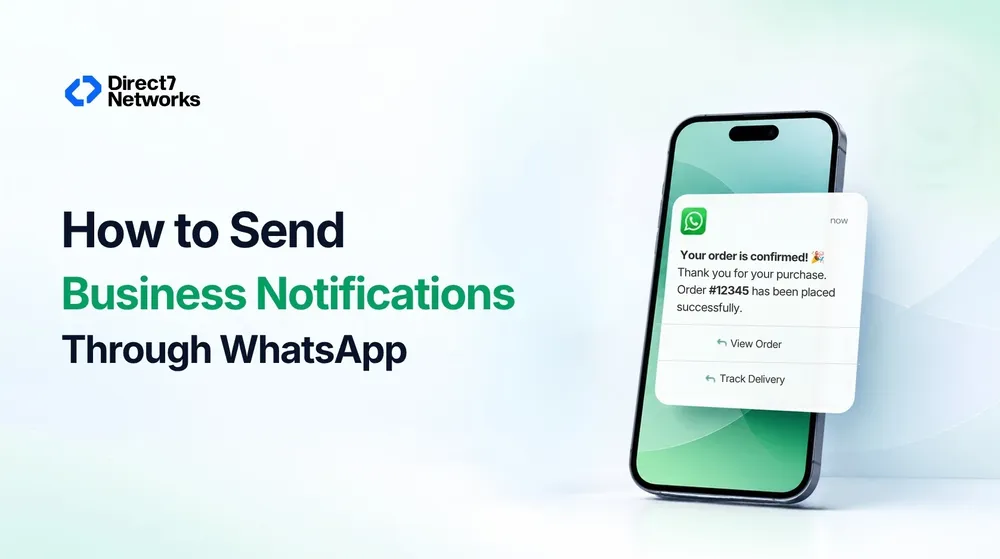

How to Send Business Notifications Through WhatsApp
Learn how WhatsApp business notifications work, what businesses need to set up, how API messaging works, and when to use WhatsApp or SMS.
A customer places an order. An appointment is confirmed. A payment goes through. A delivery changes status.
These events already happen inside a business application. The messaging problem is what happens next: how does that event become a useful notification on the customer’s phone?
WhatsApp can be one answer, particularly when the notification benefits from a richer message format or a more conversational experience. But sending a business notification through WhatsApp is not simply a matter of replacing an SMS API with a WhatsApp API.
The business needs to account for WhatsApp’s messaging rules, customer opt-in, message templates, API integration, delivery status, and the possibility that WhatsApp will not be the appropriate channel for every customer.
Here’s how the workflow fits together.
What actually happens when a business sends a WhatsApp notification?
The simplest way to understand a WhatsApp notification is to follow the business event that triggers it.
Imagine an online retailer receives an order.
The flow might look like this:
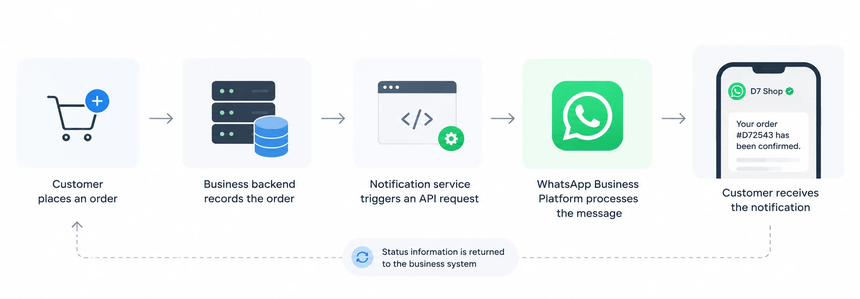
The messaging API is therefore not the source of the notification. The business application is.
The API provides the connection between the application and the messaging infrastructure.
That distinction matters when designing the system. The notification should normally be tied to a meaningful business event, such as an order being confirmed, rather than being treated as an isolated messaging task.
D7 Networks, for example, provides API-based messaging infrastructure and currently offers both SMS and WhatsApp Business API capabilities. Its WhatsApp offering is designed to connect WhatsApp messaging with an existing business system, including sending and receiving messages and integrating messaging into business workflows.
WhatsApp changes more than the message format
A common mistake is to think of WhatsApp as SMS with a richer interface.
The underlying business problem is similar: send important information to a customer at the right time. But the messaging environment is different.
A WhatsApp notification can make use of richer message formats, media and interactive experiences. At the same time, the business has to work within WhatsApp’s platform policies and messaging rules.
For business-initiated conversations on the WhatsApp Business Platform, WhatsApp’s current policy states that businesses must use an approved message template to initiate a conversation. When a user has contacted the business, the business can respond without a template during the applicable 24-hour customer-service window.
That means the message architecture has to be considered before the API call is written.
For example, an appointment notification might be designed around information such as:
Your appointment with {{business}} is confirmed for {{date}} at {{time}}.
The example illustrates the idea of variables in a notification template; it is not an official Meta template specification.
The important point is that a business should design its templates around actual notification events rather than creating one generic message and trying to use it everywhere.
What does a business need before sending notifications?
The exact setup depends on the implementation, but the business generally needs to think about several layers.
First, the WhatsApp Business Platform environment. The business needs the appropriate business account and messaging configuration.
If customers are signing up for order updates, for example, the business should make it clear that WhatsApp will be used for those updates. WhatsApp’s policy also recommends making the categories of messages clear and providing straightforward ways for people to opt out.
This is more than a checkbox in an integration. The opt-in process is part of the notification architecture.
If customers are signing up for order updates, for example, the business should make it clear that WhatsApp will be used for those updates. WhatsApp’s policy also recommends making the categories of messages clear and providing straightforward ways for people to opt out.
Third, the appropriate message template. Business-initiated notifications may need an approved template depending on the messaging context.
Fourth, the API integration. The business application needs a way to trigger the message when the relevant event occurs.
Finally, operational handling. The application should account for message status, errors, and cases where the intended recipient cannot be reached through WhatsApp.
This last part is often overlooked. Sending the API request is only one step in a production messaging system.
Which notifications make sense on WhatsApp?
WhatsApp is particularly interesting when the notification contains information that benefits from a richer customer experience.
An order confirmation, for example, can tell the customer that the order was received and provide relevant order information.
A booking confirmation can put the important details in a message the customer can easily revisit.
An appointment reminder can communicate the date and time and, where the implementation supports it, provide a more interactive path for the customer.
A delivery update can be useful when the customer needs more context than a short text alert can comfortably provide.
The common factor is not simply that these are “popular WhatsApp use cases.” It is that the notification is part of an ongoing customer interaction.
If the message only needs to communicate something extremely simple, SMS may still be perfectly appropriate.
WhatsApp vs SMS for business notifications
The choice becomes clearer when the channels are compared in the context of a notification rather than as competing technologies.
| Consideration | SMS | |
|---|---|---|
| Message format | Primarily text | Supports richer messaging formats |
| Interaction | Can support two-way SMS where available | Supports conversational and interactive experiences |
| Media | More limited | Supports richer media |
| Reach | Mobile-network based | Requires the customer to be reachable through WhatsApp |
| Customer experience | Simple and familiar | Richer messaging experience |
| Platform rules | Telecom/provider and country requirements | WhatsApp platform policies and requirements |
| Integration | SMS API | WhatsApp Business API |
Neither channel automatically wins every use case.
SMS has a major architectural advantage: it is not dependent on the customer having an active WhatsApp account. D7’s SMS platform, for example, provides connectivity across more than 190 countries and supports automated notifications, transactional messages, OTPs and delivery reporting.
WhatsApp becomes more interesting when richer content, interaction, or an existing customer relationship on WhatsApp adds meaningful value.
The better question is therefore not “Should we replace SMS with WhatsApp?”
It is:
What does this notification need to accomplish, and which channel is suited to that job?
Why some businesses keep both channels
For many systems, WhatsApp and SMS do not have to be competing choices.
A business could have:
WhatsApp-only:
WhatsApp is the designated notification channel.
SMS-only:
The notification is delivered through SMS.
Multi-channel:
The business intentionally uses both channels for different notification types or customer segments.
Fallback:
The system has defined logic for attempting an alternative channel when the primary delivery path is unavailable or unsuitable.
These are different architectures.
For example, a business might prefer WhatsApp for a booking confirmation because the customer experience benefits from richer messaging, while retaining SMS for situations where broad mobile reach is more important.
An important distinction is that “fallback” should not be assumed to mean that WhatsApp automatically switches to SMS. That behavior depends on the messaging provider, integration and business logic.
If a business wants fallback, it should design and test that logic explicitly.
The developer’s job is bigger than sending the message
A basic API integration may look straightforward:
Business event → API request → message
A production notification system needs more.
The application needs to know what event should trigger the message, which recipient should receive it, what message should be used, and what happens after the request is submitted.
For example:
Order confirmed
→ select notification template
→ populate order information
→ submit WhatsApp message
→ receive relevant status information
→ record the messaging result
→ determine whether another action is necessary
This becomes particularly important at scale. A business may have thousands of orders, appointments, or transactions generating notifications every day.
The messaging layer therefore becomes part of the application’s operational infrastructure rather than a collection of individual API calls.
D7’s messaging platform exposes API-based messaging infrastructure and delivery reporting for SMS, while its WhatsApp Business API offering provides API integration for sending and receiving WhatsApp messages.
Common mistakes when adding WhatsApp notifications
One mistake is treating WhatsApp exactly like SMS. The message may serve the same business purpose, but the platform requirements and customer experience are different.
Another is treating opt-in as an afterthought. WhatsApp’s policy makes recipient consent and honoring opt-out requests part of responsible business messaging.
A third is designing templates before understanding the actual notification workflow. A template should correspond to a real business event rather than becoming a generic container for unrelated messages.
It is also easy to assume that every customer can be reached through WhatsApp. A notification architecture should account for channel availability rather than making that assumption.
Finally, businesses sometimes focus entirely on sending and forget status handling. In a real application, knowing whether the messaging request was accepted and what happened afterward can be just as important as generating the request.
Where D7 fits
Once the notification requirements are clear, the infrastructure question becomes simpler.
A company may already have an application that generates events, but it does not necessarily want to build direct messaging infrastructure for every communication channel itself.
This is where a CPaaS layer can sit between the application and messaging networks.
D7 Networks currently provides SMS API infrastructure alongside WhatsApp Business API services. Its platform also exposes integrations and developer tooling intended to connect business applications with messaging workflows.
For a company already using SMS, this can also make the architecture question broader than simply “How do we add WhatsApp?”
The more useful question is:
How should our application manage customer notifications across the channels we actually need?
That may mean using WhatsApp for notifications where richer messaging is useful, SMS where reach and simplicity matter, or both as part of a deliberately designed messaging architecture.
The important thing is to make that decision at the workflow level, not at the level of individual messages.
The practical takeaway
Sending a business notification through WhatsApp starts with a business event, not with WhatsApp itself.
The application determines that something happened. The messaging layer turns that event into a customer communication. WhatsApp then adds its own requirements around business-initiated messaging, templates, opt-in and platform policies.
That is why a successful implementation needs more than an API endpoint.
Before building the integration, decide which notifications actually benefit from WhatsApp, establish the required customer permissions and templates, connect the messaging API to real business events, handle status and failures, and decide whether SMS has a role alongside WhatsApp.
For some workflows, WhatsApp will be the natural channel. For others, SMS will remain simpler. And for businesses with varied customer requirements, the answer may be a messaging architecture that uses both.
The channel is only one part of the system. The real objective is to deliver the right notification, through the right channel, at the right point in the customer’s journey.