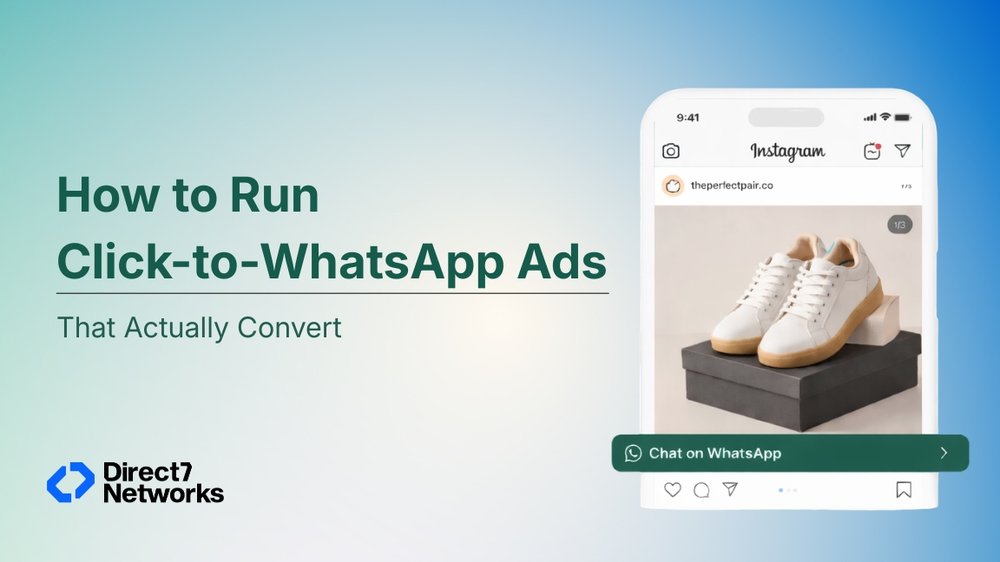

How to Run Click-to-WhatsApp Ads That Actually Convert
You've run the ad. The creative looked good, the targeting was tight, and the clicks came in. But then silence. People landed on your page, looked around for a few seconds, and left. No enquiry, no purchase, no trace.
This is the quiet failure of most lead generation funnels. The gap between a click and a conversion is where interest dies. By the time someone fills a form, waits for a callback, or navigates a landing page that wasn't built for mobile, the moment has passed.
WhatsApp changes that. Not because it's trendy, but because it's already where your customers are and a message feels personal in a way a landing page never will. When someone clicks an ad and lands in a live chat with your business in under three seconds, the dynamic shifts completely. You're not chasing a lead. You're having a conversation.
How Click-to-WhatsApp Ads Actually Work
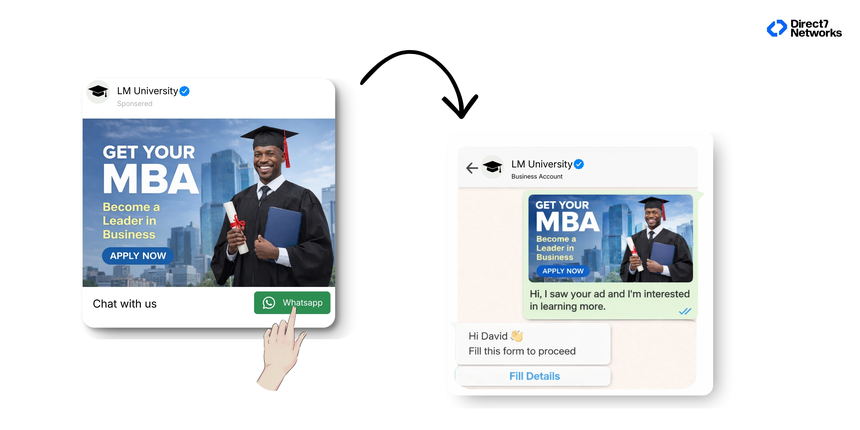
The mechanics are simpler than most people expect. Inside Meta Ads Manager, when you create a campaign with the engagement or traffic objective, you can set your conversion location to "Messaging Apps" and select WhatsApp as the destination. Your ad runs on Facebook or Instagram exactly as it normally would image, video, carousel but the CTA button ("Send Message," "Chat Now," "Get a Quote") opens a WhatsApp thread instead of a URL.
The key technical detail most marketers overlook: the pre-filled message. When the user hits that button, WhatsApp opens with a message already typed in their chat box something like "Hi, I saw your ad and I'm interested in learning more." They just tap Send. This removes friction and tells your sales team exactly which ad triggered the conversation.
Why This Outperforms a Landing Page in Specific Situations
Landing pages still have their place but for certain business types, they're the wrong tool entirely.
Think about a high-consideration purchase: a custom piece of furniture, a skincare treatment, an insurance plan. People have questions before they buy. A landing page can't answer them. But a conversation can. When you replace the landing page with a WhatsApp thread, you meet the customer exactly where their decision is happening.
The same logic applies to service businesses dental clinics, real estate agents, tutors, interior designers. These aren't impulse buys. The customer needs reassurance, information, and a human touch before they commit. WhatsApp delivers all three.
Then there's the geography factor. In markets like India, the Middle East, Southeast Asia, and much of Africa and Latin America, WhatsApp is not just a messaging app it's the primary communication channel. People check it before email, before SMS, before anything else. Running Meta ads WhatsApp campaigns in these regions and directing traffic to a landing page is leaving money on the table.
WhatsApp messages carry an open rate above 98% compare that to email, and the case for conversational marketing becomes obvious.
Writing Ad Creative That Primes the Conversation
The biggest mistake in click-to-WhatsApp campaigns is treating the ad like a normal traffic ad. It's not. The goal isn't just a click it's a qualified first message.
Your ad copy should do three things before the click:
- Identify the right person - Be specific about who this is for. "Attention Bangalore homeowners looking to renovate in 2025" will outperform "Looking for interior design services?" every time. Specificity filters out bad leads and attracts good ones.
- Introduce a tension - What problem does your audience have that you solve? Name it plainly. "Most clinics take 3 days to confirm appointments. We do it in 3 minutes on WhatsApp." That's a hook that earns the click.
- Make the CTA feel low-commitment - "Chat with us" or "Ask us anything" feels lighter than "Buy Now" or "Book a Consultation." People are far more willing to start a conversation than to commit to a purchase. Your WhatsApp CTA should feel like the beginning of a dialogue, not a transaction.
For visuals: short videos (under 15 seconds) showing the product in use, or before/after results, consistently outperform static images in click-to-chat ads. They give people enough context to feel curious not enough to feel satisfied.
The Pre-Filled Message: The Lever Nobody Optimises
Here's the part that separates campaigns that convert from campaigns that just generate chats.
The pre-filled message isn't just a convenience feature. It's a qualification tool and a conversation starter in one. When you write this message, you're essentially scripting the customer's opening line. Make it work for you.
A weak pre-filled message: "Hi, I want to know more."
A stronger one: "Hi, I just saw your ad for the [Product Name]. I'm interested in the [specific variant/size/service]. Can I get pricing details?"
Why does this matter? Because it tells your team (or your chatbot) exactly what the person is interested in before anyone types a single reply. It also makes the customer feel heard the conversation already has context.
If you're running multiple ad sets for different products or audiences, use different pre-filled messages for each. This seems obvious but almost nobody does it.

What Happens After the First Message: Where Most Campaigns Fall Apart
Getting the message is not the win. Converting it is.
Response time is everything - A lead that messages you and waits 4 hours is already looking at your competitor. Aim for a response within 5 minutes during business hours. When someone messages you from your ad, they have high interest in your product or service don't waste it with a generic reply.
Your opening reply should reference the ad. Something like: "Hi [Name]! I can see you're interested in our [Product]. Let me help you with that." It shows you're paying attention.
From there, use two or three qualifying questions to understand their need before pitching:
- For e-commerce: "What size/colour/variant are you looking for?"
- For services: "What's your timeline?" or "Where are you located?"
- For real estate: "Are you looking to buy or invest? What's your budget range?"
Keep it conversational you're not filling out a form, you're having a chat. One question at a time.
To keep conversations from going cold, build a simple follow-up sequence: if there's no reply after 24 hours, send a soft nudge. This is where the WhatsApp Business API becomes essential it lets you automate follow-ups, trigger responses based on keywords, and manage high conversation volumes without a dedicated agent on standby 24/7. For teams handling dozens of inbound chats a day, running without it isn't sustainable.
Three Real-World Use Cases
Fashion brand — size and style queries A D2C clothing brand runs Instagram ads for a new collection. Instead of a product page, the WhatsApp CTA opens with: "Hi! I saw the summer collection ad can you help me find the right size?" The pre-filled message removes the first awkward step. The brand's team (backed by a WhatsApp Chatbot handling first-response and size queries) asks two questions, shares a size guide, and closes the sale in the same thread. Return rate dropped because buyers were better informed before purchasing.
Real estate agency — lead qualification An agency in Dubai runs Facebook ads targeting Indian expats interested in property investment. The pre-filled message reads: "I'm interested in the investment properties ad. What options are available under AED 1M?" The agent immediately knows the budget, the profile, and the intent. No form, no waiting, no wasted discovery call.
Healthcare clinic — consultation bookings A dermatology clinic runs WhatsApp lead generation ads targeting people searching for acne treatment solutions. The conversation starts with a skin concern question, moves to a brief triage, and ends with a confirmed appointment slot all within one WhatsApp thread. Apollo 24|7 used a similar approach on WhatsApp to increase bookings by 49% and grow average revenue per order by 72%.
The CTWA Campaign Checklist
Before you launch, run through this:
- Objective set correctly — Use Engagement (Messages) for most campaigns; Sales for retargeting warm audiences
- Pre-filled message customised — Specific to the ad, not generic
- Response workflow ready — Human agent, chatbot, or hybrid someone/something replies within 5 minutes
- Opening reply templated — Acknowledges the ad, feels personal
- Qualifying questions mapped — 2–3 questions max, conversational order
- Follow-up sequence built — 24hr nudge for non-responders via WhatsApp Business API
- Tracking in place — Monitor Cost per Conversation, Conversation-to-Lead rate, and Lead-to-Close rate separately
- Campaign left to run for at least 7 days before making changes, Meta's algorithm needs time to learn
The Bigger Opportunity
Most businesses treat WhatsApp as a support channel,something you use after the sale. The smarter move is to bring it into the acquisition process. Click-to-WhatsApp ads do exactly that. They don't replace your funnels; they replace the weakest part of them the moment when interest meets friction.
The one thing to do today: look at your current best-performing Meta ad and rerun it as a WhatsApp click campaign. Keep the creative, change the destination. Give it two weeks, track cost per conversation against your current cost per lead, and see what happens. The comparison will be instructive.
The conversation channel is open. The question is whether you're on the other end of it.