
Integrating WhatsApp with CRM and ERP Systems
How APIs connect WhatsApp to customer data and business workflows — explained simply, with practical steps you can use tomorrow.
Customers no longer see WhatsApp as just another communication channel. They expect conversations to trigger real business actions—tracking an order, booking an appointment, approving a payment, or updating account information—without switching to another application.
Meeting those expectations requires more than connecting WhatsApp to a chatbot. It requires integrating WhatsApp with CRM, ERP, customer support, and business systems so every conversation has access to real-time customer data and operational workflows.
This guide explains how to design scalable WhatsApp integrations, choose the right integration architecture, connect enterprise systems securely, and build conversational workflows that support both automation and human agents.
How the Pieces Fit Together (The Practical Stack)
1. WhatsApp Channel Layer
- This is your WhatsApp Business Account — either Cloud API (managed by Meta) or on-premise API.
- It handles:
- Sending and receiving messages.
- Managing templates, media, and interactive elements (buttons, lists, carousels).
- Pushing inbound message events (like user replies) to your server or middleware.
Explore more about WhatsApp API here
2. Integration Layer (Middleware / API Orchestration)
- This is the “brain” between WhatsApp and your internal systems.
- It typically includes:
- Webhooks to receive WhatsApp events in real time.
- Middleware services or iPaaS platforms (like Zapier, Make, or custom Node.js/Python services).
- Business logic to interpret messages, enrich data, and route actions.
Key functions:
- Parse message intent (e.g., “Track order 1234”).
- Query CRM or ERP for relevant data.
- Apply workflow rules (refunds, order updates, reminders).
- Send structured replies or trigger next actions.
Try WhatsApp API Integration at https://d7networks.com/integrations/
3. Core Systems (CRM / ERP / Backends)
- These are your systems of record, where verified data lives:
- Customer profiles, purchase history → in CRM.
- Orders, inventory, invoices → in ERP.
- Policies, FAQs → in Knowledge Bases.
- The integration layer reads and writes to these systems through secure APIs, ensuring real-time synchronization.
Common WhatsApp Integration Architecture Patterns
Different organizations require different integration architectures depending on system complexity, transaction volume, and governance requirements.
| Architecture | Best For | Advantages | Limitations |
|---|---|---|---|
| Native CRM Integration | Organizations using supported CRM platforms | Fast deployment, minimal development | Limited customization |
| Middleware / iPaaS | Small and medium businesses | Low-code automation, rapid implementation | Less control over complex workflows |
| Custom API Integration | Large enterprises | Maximum flexibility and security | Higher development effort |
| Hybrid Architecture | Growing organizations | Combines rapid development with custom business logic | Increased operational complexity |
No integration model is universally best. The right architecture depends on workflow complexity, existing systems, compliance requirements, and long-term maintenance strategy.
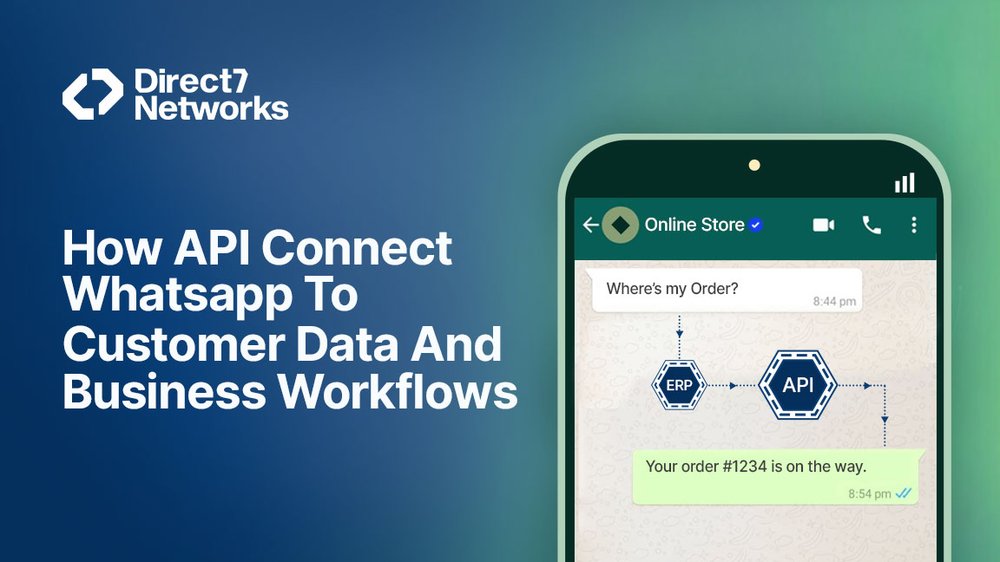
Example: Typical End-to-End Flow
| Step | Process | System Involved |
|---|---|---|
| 1. | Customer sends “Track order 1234” via WhatsApp. | |
| 2. | Message is received by your webhook endpoint.Validate webhook authenticity before processing requests. Signature verification prevents unauthorized systems from injecting events into your workflow. | Channel Layer |
| 3. | Middleware detects “Track order” intent and queries ERP.Intent detection should extract structured business data such as order numbers, appointment IDs, or invoice references before querying backend systems. | Integration Layer + ERP |
| 4. | ERP returns live order status.Implement request timeouts and fallback logic so temporary ERP outages do not block customer conversations. | ERP |
| 5. | Middleware formats a friendly WhatsApp reply (e.g., “Your order will arrive today by 4 PM”).Separate presentation logic from business logic. Backend systems should return structured data, while middleware formats customer-friendly responses. | Integration Layer |
| 6. | Bot sends messages back via WhatsApp API. | Channel Layer |
| 7. | Middleware logs the conversation in CRM and creates follow-up if needed.Store conversation summaries, customer actions, timestamps, and workflow outcomes to improve reporting, customer history, and future support interactions. | CRM |
Common Integration Approaches and When to Use Each
There’s no one-size-fits-all way to connect WhatsApp with CRM and ERP systems.
Your ideal approach depends on your business complexity, technical maturity, and how much control you need over customization.
Below are the four main integration models — and when each makes the most sense.
1.Native CRM / ERP Connectors
What It Is:
Many enterprise platforms now include built-in WhatsApp modules (e.g., Salesforce Digital Engagement, HubSpot Conversations, Zoho, SAP C4C).
Why It Works:
- Fastest to deploy — minimal coding required.
- Provides agent-friendly interfaces and pre-configured workflows.
- Handles message templates, routing, and opt-out management out of the box.
When to Use:
Choose this if your CRM/ERP already supports WhatsApp and your business processes fit within its native configuration. Avoid it if you need deep customization or external system orchestration.
2. Middleware / Integration Platforms (iPaaS)
What It Is:
Platforms like Make, Zapier, and ActiveCampaign act as a bridge between WhatsApp and your backends.
They provide drag-and-drop automation and pre-built connectors for popular systems (Salesforce, HubSpot, Shopify, NetSuite, etc.).
Why It Works:
- Accelerates integration without heavy engineering.
- Ideal for non-developers or operations teams.
- Supports visual flow orchestration and quick iteration.
When to Use:
Use when you want speed, flexibility, and low engineering overhead.
Perfect for small to mid-sized teams that prioritize time-to-market over full control.

3. Custom API Integration
What It Is:
A fully custom build using webhooks, REST APIs, and backend logic to connect WhatsApp with CRM, ERP, or billing systems.
Why It Works:
- Provides total control over architecture, performance, and security.
- Supports complex workflows (multi-step approvals, data enrichment, audit trails).
- Integrates seamlessly with proprietary or legacy systems.
When to Use:
Ideal for enterprises or regulated sectors needing:
- Advanced performance tuning.
- Sensitive data handling (finance, healthcare).
- Complex two-way transactions (e.g., refunds, order changes).
Expect higher engineering effort but maximum flexibility and compliance control.
4. Hybrid Approach
What It Is:
Combines middleware for messaging orchestration with custom microservices for deeper CRM/ERP writes or validations.
Why It Works:
- Best of both worlds: fast flow design + custom logic where needed.
- Easier to maintain than full-code builds while retaining flexibility.
When to Use:
Perfect for growing organizations scaling from basic automation to enterprise-grade workflows.
Questions to Answer Before Integrating WhatsApp
Before connecting WhatsApp to business systems, define how conversations will interact with operational workflows.
Which business processes should begin inside WhatsApp?
Identify which customer journeys—such as order tracking, appointment booking, or support requests—will start within WhatsApp rather than another channel.
Which platform owns customer data?
CRM should usually remain the authoritative source for customer information, while ERP manages operational and transactional records.
How will duplicate records be prevented?
Design workflows so repeated messages or webhook retries cannot create duplicate tickets, orders, or customer records.
Which workflows require human approval?
Determine where automation should stop and agents should review requests, especially for refunds, billing changes, or regulated activities.
How will failures be detected?
Plan monitoring for webhook failures, API timeouts, synchronization errors, and messaging delivery problems before production deployment.
Which business metrics define success?
Measure outcomes such as automation completion rate, customer response time, resolution speed, and agent productivity—not just message volume.
Event-Driven vs Request-Driven Integrations
Not every WhatsApp workflow should operate the same way.
Request-driven integrations respond immediately to customer actions, such as checking an order status or retrieving account information. These workflows require fast responses and are ideal for real-time interactions.
Event-driven integrations respond to business events rather than customer requests. Examples include shipping notifications, appointment reminders, payment confirmations, or inventory alerts. These workflows rely on webhooks, message queues, and asynchronous processing to improve scalability.
Many enterprise implementations combine both approaches, using synchronous APIs for customer interactions and asynchronous events for background automation.
What Integrations Actually Automate (Real Use Cases)
Once your WhatsApp layer connects to business systems, automation can cover the entire customer lifecycle — from lead to billing.
1. Lead Capture → CRM
- How it works: Customer chats generate lead records in CRM with name, tags, and conversation source.
- Value: Sales teams get instant visibility and assigned tasks — no manual entry.
2. Order Confirmation & Tracking → ERP
- How it works: WhatsApp bots automatically confirm purchases, update shipping status, and provide live tracking using ERP data.
- Value: Reduces customer “Where’s my order?” queries and improves transparency.
3. Support Ticket Creation & Context → CRM
- How it works: When a bot can’t resolve an issue, it creates a CRM ticket with the full chat transcript and user profile.
- Value: Agents start with context, avoiding repetitive questioning.
4. Inventory Checks & Reservations → ERP
- How it works: Customers can check stock in real time; the ERP temporarily reserves inventory while they complete checkout.
- Value: Fewer lost sales from stockouts or delays.
5. Billing and Receipts → Finance Systems
- How it works: Chat-triggered invoicing, payment links, and confirmation updates sync directly with accounting or billing modules.
- Value: Automates the post-sale process and improves accuracy.
6. Field Operations & Workflows
- How it works: Dispatch or maintenance teams receive WhatsApp alerts tied to ERP work orders (e.g., job assignments, status updates).
- Value: Improves field coordination, SLA compliance, and visibility.
Summary:
Every integration should aim to remove manual steps between WhatsApp and core systems. When designed well, it doesn’t just answer questions — it drives the workflow.
Design and Data Considerations You Must Plan For
A strong WhatsApp–CRM/ERP integration is not just about connecting APIs. It’s about data discipline, reliability, and trust. Poor data mapping or missed security controls can break workflows — or worse, expose sensitive information.
Below are the seven key design and data pillars you must plan for before going live.
1. Data Mapping
What It Is:
Mapping defines how customer and transaction data moves between systems — from WhatsApp messages to CRM/ERP records.
Best Practices:
- Decide which fields flow in and out of chat (e.g., customer name, order ID, order status, SLA).
- Keep mappings consistent and versioned so updates don’t break alignment.
- Validate data types and null-handling before writing to systems of record.
Goal: ensure messages, records, and business dashboards always reflect the same data source of truth.
2. Message Templates and Localization
What It Is:
WhatsApp proactive messages (e.g., confirmations, reminders, re-engagements) must use pre-approved templates per Meta’s policy.
Best Practices:
- Design templates for clarity — one purpose per message.
- Localize content for each region and language.
- Maintain a template library with version control and expiry tracking.
- Include compliance fields (opt-out note, sender info).
Goal: compliant, customer-friendly messaging across every market.
3. Consent and Opt-In Tracking
What It Is:
Consent management ensures you message only users who have explicitly opted in.
This is mandatory under WhatsApp Business rules and most data protection laws.
Best Practices:
- Record who, where, and when each user opted in.
- Store consent flags in your CRM contact record.
- Sync opt-outs instantly across all tools — WhatsApp, CRM, marketing platforms.
- Keep timestamps and sources for audit readiness.
Goal: a single, authoritative source of truth for consent status.
4. Security and Privacy
What It Is:
WhatsApp chats may carry sensitive information — personal details, order IDs, billing references — so security must be built in from day one.
Best Practices:
- Never expose confidential data in plain messages.
- Use short-lived secure links or require authentication for access to private content (e.g., payment pages, health data).
- Encrypt data both in transit (TLS) and at rest in your database.
- Apply least-privilege access controls for your integration accounts.
Goal: protect customer trust and comply with privacy regulations.
5. Failure Handling and Idempotency
What It Is:
In real-world networks, retries happen. WhatsApp webhooks can trigger multiple times, and backend APIs can occasionally timeout.
Best Practices:
- Build idempotent webhook handlers so repeated messages don’t create duplicate tickets or orders.
- Assign unique request IDs to each transaction.
- Log every request and response pair for traceability.
Goal: reliability — every message should be processed once and only once.
6. Rate Limits and Batching
What It Is:
Both WhatsApp APIs and your CRM/ERP backends have rate limits to prevent overload.
Best Practices:
- Respect platform API rate limits.
- Use asynchronous queues for non-urgent operations.
- Batch or schedule heavy updates (e.g., nightly syncs).
- Apply retry backoffs with exponential delays for error handling.
Goal: maintain stability and scalability as volume grows.
7. Audit Trails
What It Is:
Complete, timestamped logs for every key event — essential for compliance, debugging, and analytics.
Best Practices:
- Log message content (anonymized where necessary), API calls, and consent changes.
- Store logs securely with retention policies (e.g., 90–180 days).
- Tag logs by user ID, order ID, and session for traceability.
Goal: make every conversation and API action auditable end-to-end.
Summary:
Designing for success means planning for consistency, security, and resilience.When your data mappings, consent controls, and logging are airtight, your WhatsApp integration will scale confidently — no surprises, no downtime.
Agent Experience and Handoff
Integrations should make agents faster, not busier. A well-designed WhatsApp–CRM/ERP integration enhances productivity by giving agents full context, actionable tools, and effortless escalation options, all within one interface.
Best Practices for an Optimized Agent Experience
1. Surface Full Context
- Show complete ticket history, recent orders, and CRM notes directly in the agent workspace.
- Include metadata like customer lifetime value, order IDs, and previous resolutions.
Benefit: Agents resolve queries faster and avoid asking repetitive questions.
2. Suggested Replies and Quick Actions
- Offer predefined responses or clickable actions (e.g., issue refund, reassign order, trigger return).
- Let agents execute common workflows without leaving the chat interface.
Benefit: Reduces clicks and average handling time (AHT).
3. One-Click Handoff
- Enable seamless escalation from bot to human, transferring all conversation history, user data, and intent metadata.
Benefit: Customers never need to “start over.” Agents pick up mid-conversation with full context.
4. Queue and SLA Rules
- Route messages intelligently based on language, product line, customer tier, or risk level.
- Apply SLA timers to track escalation response times.
Benefit: Balanced workloads, improved SLA adherence, and faster resolutions.
💡 Insight: Even a small boost in agent context can reduce handling time by 20–30%. Integrations should empower agents, not just automate responses.
Implementation Roadmap (Practical Steps)
Follow this phased approach to move from concept to production safely and effectively:
| Step | Action | Key Output |
|---|---|---|
| 1. Start with a business case | Pick one measurable use case (e.g., order tracking, appointment booking, or lead capture). | Clear goal and KPIs |
| 2. Model data flows | Define which CRM/ERP fields are read or written and design API calls. | Data mapping diagram |
| 3. Pick integration approach | Choose between native connector, middleware, custom API, or hybrid model. | Technical architecture |
| 4. Build templates and consent flows | Create pre-approved WhatsApp templates and simple opt-in UX. | Approved messaging setup |
| 5. Develop and test | Implement webhooks, validate idempotency, simulate retries and failures. | Tested backend integration |
| 6. Pilot with a small audience | Run with 500–2,000 users. Track performance, agent feedback, and business metrics. | Pilot results and feedback loop |
| 7. Iterate and expand | Gradually add new flows (e.g., returns, billing queries) and automate repetitive tasks. | Scaled automation |
| 8. Monitor and govern | Build dashboards for delivery rates, API errors, escalations, and CSAT. | Continuous improvement system |
Tip: Integrate early with analytics dashboards (e.g., Power BI, Looker, or Grafana) for real-time visibility.
Common Pitfalls and How to Avoid Them
| Problem | Why It’s a Problem | How to Avoid It |
|---|---|---|
| Automating everything too soon | Over-automation leads to broken flows and poor UX. | Start small; validate one use case first. |
| Ignoring consent and templates | Violations trigger message blocking or regulatory issues. | Follow WhatsApp Business and regional compliance from day one. |
| Poor data hygiene | Dirty CRM/ERP data multiplies agent workload. | Clean and validate records before syncing. |
| No fallback strategy | Bots can fail; customers need human help. | Always include human handoff and escalation paths. |
| Not planning for scale | Volume spikes break APIs and queues. | Design for rate limits, queuing, and retries. |
Building Enterprise WhatsApp Integrations with D7 Networks
WhatsApp Business API Integration
D7 Networks provides APIs and webhook capabilities that allow businesses to connect WhatsApp conversations with CRM, ERP, and other enterprise applications.
Enterprise Workflow Automation
Middleware compatibility enables organizations to integrate messaging workflows with customer records, order management, support platforms, and business automation processes.
Operational Visibility
Delivery reporting and webhook events provide operational insight into message delivery and workflow execution.
Final Thoughts
Connecting WhatsApp to CRM and ERP systems transforms conversations into operational workflows. Instead of simply exchanging messages, businesses can automate customer service, synchronize enterprise data, and trigger real business actions from a single chat interface.
Successful implementations depend on more than APIs. They require well-designed integration architecture, secure data governance, reliable webhook processing, and continuous operational monitoring. When these foundations are in place, WhatsApp becomes an extension of your enterprise systems rather than an isolated communication channel.
Organizations implementing WhatsApp Business at scale should also prioritize observability, human handoffs, and workflow governance to ensure automation improves both customer experience and operational efficiency.