
WhatsApp Business Onboarding: A Step-by-Step Guide for Easy Integration
Learn How to Onboard WhatsApp API effectively in your Business
Customer communication plays a critical role in business success, and the WhatsApp Business API has become one of the most effective channels for engaging customers worldwide. From automated notifications and customer support to personalized marketing campaigns, WhatsApp enables businesses to build stronger customer relationships through a familiar and trusted platform.
Getting started with the WhatsApp Business API begins with a smooth onboarding process. Proper onboarding ensures your business account is configured correctly, allowing you to start communicating with customers quickly and efficiently.
This guide walks you through the complete onboarding process with Direct7 Networks and highlights the key features available once your account is set up.
Before You Begin
Before starting the onboarding process, make sure you have the following:
A Valid Phone Number: You will need a number that is not currently registered on a standard WhatsApp app.
Facebook Page – Ownership or admin access to a Facebook page is required for WhatsApp Business API integration.
Meta Business Account
A Meta Business Account is required for WhatsApp Business API integration and verification.
Business Verification Documents
To complete Meta Business Verification, prepare at least two of the following documents:
- Certificate or Articles of Incorporation
- Business Registration or License Document
- Government-issued Business Tax Documents (excluding self-filed tax documents)
- Business Bank Statement
- Utility Bill
No Number? Use Meta's Provided Number
If you don't have a dedicated phone number available, you can onboard using a number provided directly by Meta. In this flow, you'll simply set your display name — no physical SIM or verification call required. It's a quick, flexible path to getting started
Step-by-Step Onboarding Process
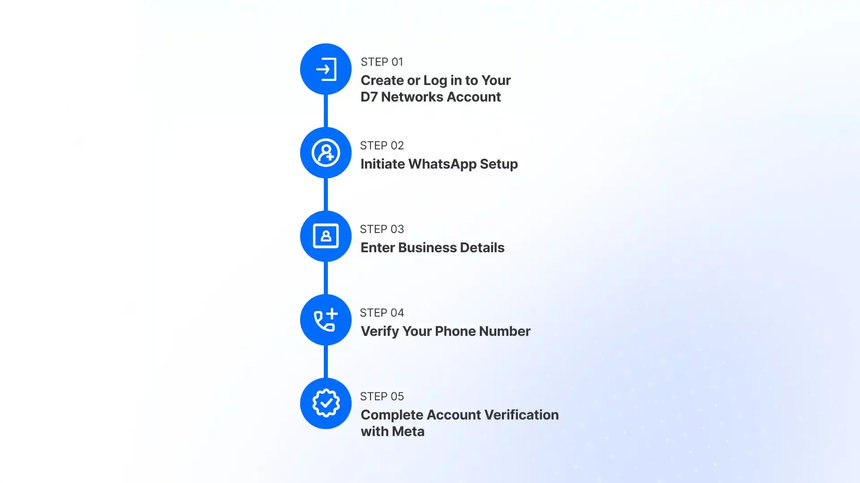
Step 1: Create or Log In to Your D7 Networks Account
Visit D7 Networks Sign-in to sign up with your email or log in if you're an existing user. Once in, you'll land on the D7 dashboard — your central hub for all WhatsApp setup and management.
Step 2: Initiate WhatsApp Setup
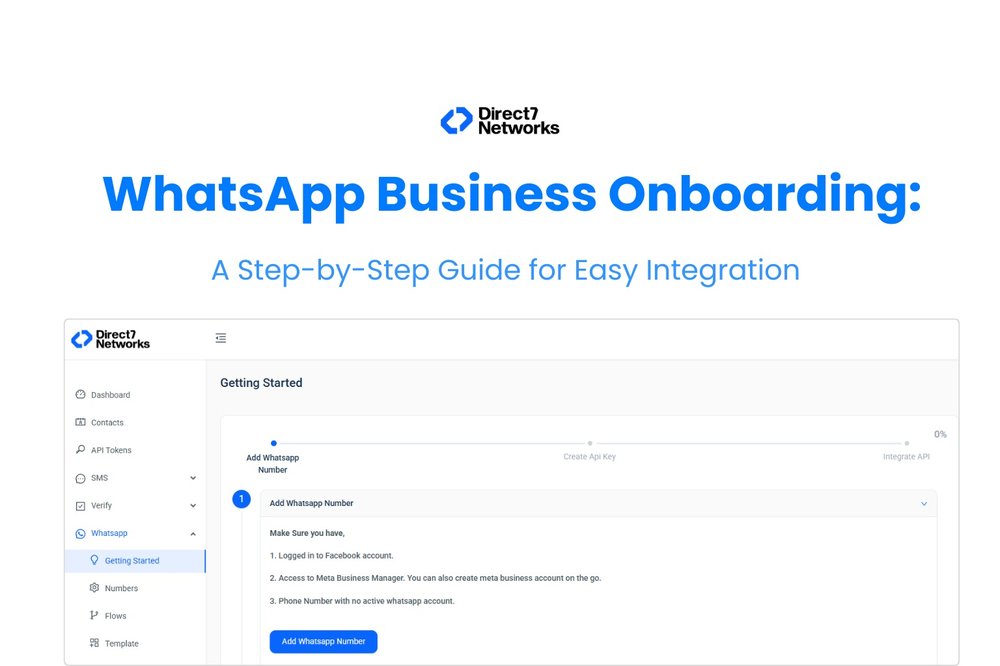
Navigate to the WhatsApp tab on the D7 dashboard and click "Getting Started," then "Add WhatsApp Number." A guided window will walk you through authorization and phone number verification.
Multiple Numbers, One Account — D7 Networks lets you onboard and manage multiple WhatsApp numbers under a single account. Whether you're running separate numbers for different departments, regions, or brands, everything stays organized under one roof.
Step 3: Enter Business Information
Provide the required business details, including:
- Business Name
- Email Address
- Website URL
- Country
- Business Category
You will also be asked to specify your desired WhatsApp display name, which customers will see when interacting with your business.
Step 4: Verify Your Phone Number
Add your preferred phone number and choose a verification method:
- SMS Verification
- Voice Call Verification
Enter the verification code received to complete the phone number setup.
Step 5: Complete Meta Business Verification
To activate and scale your WhatsApp Business account, Meta requires business verification.
During this process, submit the required business documents and complete the verification steps through Meta Business Suite.
Verification helps establish trust, unlock higher messaging capabilities, and ensure compliance with Meta's business policies.
Step 6: Add Payment Methods and Recharge Your Account
After successful verification, configure your payment method and fund your account balance.
This enables you to send WhatsApp messages, launch campaigns, and utilize messaging services without interruption.
Step 7: Manage Your WhatsApp Business Profile
Once onboarding is complete, you can manage your WhatsApp Business profile directly from the platform.
Key profile management features include:
- Updating your business display name
- Adding or changing your profile picture
- Managing business descriptions
- Updating contact information
- Configuring business hours
- Maintaining other profile details visible to customers
Having a complete and professional profile helps build customer trust and improves engagement.
Step 8: Create Message Templates and Start Campaigning
WhatsApp message templates are required for business-initiated conversations.
Create templates that comply with Meta's messaging policies and submit them for approval.
Once approved, you can:
- Send notifications and alerts
- Launch marketing campaigns
- Deliver transactional messages
- Automate customer engagement workflows
Onboard Multiple WhatsApp Numbers
Businesses with multiple departments, brands, locations, or use cases can onboard multiple WhatsApp numbers under the same account.
This allows you to:
- Manage multiple business numbers centrally
- Separate customer support, sales, and marketing communications
- Maintain better operational control
- Scale customer engagement across different teams and regions
Expert Support Throughout the Onboarding Process
Setting up WhatsApp Business API can involve multiple technical and verification steps. To make onboarding easier, D7 Networks provides live support from onboarding specialists who can assist with:
- Account setup
- Phone number onboarding
- Meta Business Verification
- Template approval guidance
- Profile configuration
- Campaign launch preparation
Our experts help ensure a faster and smoother onboarding experience, allowing you to start engaging with customers without unnecessary delays.
Start Your WhatsApp Business Journey Today
A successful onboarding process lays the foundation for effective customer communication. Whether you're using your own business number, onboarding multiple numbers under a single account, or leveraging a Meta-provided number, D7 Networks makes the process simple and efficient.
With expert guidance, profile management tools, and scalable messaging capabilities, your business can quickly unlock the full potential of the WhatsApp Business API and deliver exceptional customer experiences.
Get started today and transform the way you connect with your customers.
Happy Messaging!