
WhatsApp OTP: A Complete Guide to WhatsApp Authentication, Verification & OTP Services
Logging in should take seconds. But in reality, users wait for delayed OTPs, retry multiple times, or abandon the process entirely. For businesses, that friction directly translates into lost conversions, failed signups, and support tickets.
Today, many businesses are improving authentication by using WhatsApp OTP alongside SMS, creating a faster and more reliable verification experience across different user scenarios.
What Is WhatsApp based Verification?
WhatsApp-based verification is a method of confirming a user’s identity by sending a one-time password (OTP) verification message through WhatsApp instead of (or alongside) other channels.
What It Means in Simple Terms
When a user tries to:
- Sign up
- Log in
- Reset a password
- Complete a transaction
They receive a verification code on WhatsApp, which they enter (or auto-fill) to prove they are the rightful owner of the phone number.This process becomes even more secure when used as WhatsApp 2FA, where the OTP acts as an additional layer beyond passwords.
How WhatsApp Authentication Works
The flow is simple once you understand the moving parts:
- User triggers authentication — They attempt to log in, sign up, reset a password, or complete a payment.
- Backend generates a code — Your system creates a unique, time-limited OTP (typically 4–8 digits, valid for 5–10 minutes).
- Code is sent via WhatsApp Business API — Using a pre-approved authentication message template, the OTP is delivered to the user's WhatsApp number.
- User receives and enters the code — They see it in their WhatsApp chat and type it into your app or website.
- System validates — Your backend checks the code against what was issued. If correct, access is granted. If expired or wrong, the user can request again.
- Code is invalidated — Once used successfully (or expired), the OTP is voided to prevent reuse.
The entire sequence, from trigger to delivery, typically completes in under three seconds.
Types of WhatsApp Authentication Templates
WhatsApp supports three types of authentication message templates. Choosing the right one depends on your platform and your users' devices.
One-Tap Autofill Templates
With this template type, users see a button in the WhatsApp message. One tap loads your app and automatically populates the OTP field — no manual copying required. This is the smoothest experience available and has a measurable positive impact on conversion. The trade-off: it requires a technical handshake between your app and WhatsApp, and it only works on Android.
Copy Code Templates
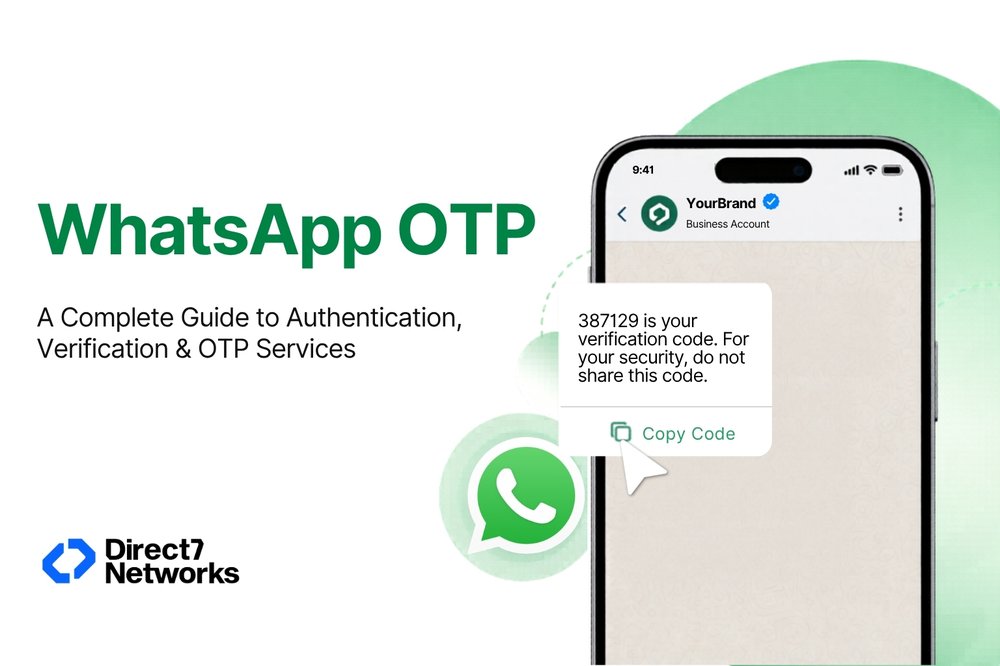
The standard format. The OTP is displayed in the message with a "Copy Code" button. The user copies it and pastes it into your interface. Simple, universally supported across Android and iOS, and easy to implement. This is what most businesses start with.
Sample message:
487291 is your verification code. For your security, do not share this code. This code expires in 10 minutes.
Zero-Tap Authentication Templates (Android)
The most seamless option — WhatsApp can automatically detect and pass the OTP to your app without any user action at all. This silent verification only works on Android and requires specific integration steps. It's ideal for high-volume, low-friction flows like ride-hailing, food delivery, or fintech apps where every extra tap adds measurable drop-off.
Why Choose WhatsApp for Authentication
Delivery speed: Around 95% of WhatsApp OTPs arrive within three seconds. SMS can take anywhere from 5 to 30+ seconds, and that gap widens during network congestion.
End-to-end encryption: Every WhatsApp message is encrypted in transit. SMS is not — it's vulnerable to SIM-swapping and SS7 protocol attacks, which have been used to compromise accounts at major companies. WhatsApp's architecture significantly reduces this attack surface.
User trust: Messages arrive in a familiar interface, from a named business account. Users already know WhatsApp. They don't need to read a new notification style or trust an unknown shortcode.
Global reach without telecom dependency: WhatsApp delivers over the internet, which means performance doesn't depend on local carrier infrastructure. This is particularly valuable in markets where SMS delivery is inconsistent — parts of Southeast Asia, Africa, and Latin America, for example.
Cost: Authentication templates on WhatsApp are often priced at roughly one-third of standard business messaging categories, and frequently 40–60% cheaper than SMS at scale.
Key Use Cases for WhatsApp Authentication
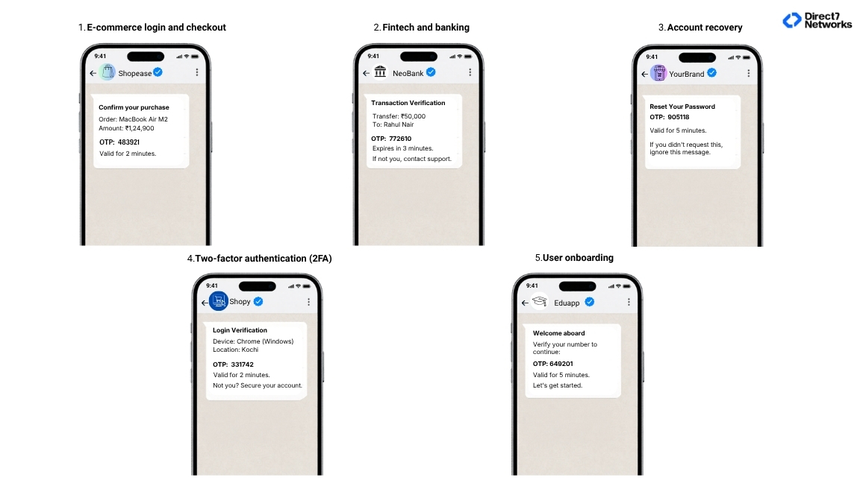
E-commerce login and checkout: Sending an OTP before a high-value purchase confirms identity at the moment it matters most, reducing fraud while adding minimal friction.
Fintech and banking: For account access, fund transfers, and KYC verification, WhatsApp OTP provides an auditable, encrypted channel that meets compliance requirements in many jurisdictions (GDPR, TRAI, LGPD).
Account recovery: When users are locked out, WhatsApp provides a fast recovery path, especially important because failed account recovery is one of the top reasons users abandon platforms permanently.
Two-factor authentication (2FA): Used alongside a password, WhatsApp OTP creates a second verification layer that's much harder to intercept than SMS.
User onboarding: First-time signups that verify via WhatsApp tend to have higher completion rates because the process feels familiar and fast.
How to Send WhatsApp Authentication Messages
At a technical level, WhatsApp OTP delivery runs through the WhatsApp Business API. Businesses can access this either directly or through a Business Solution Provider (BSP), also known as a WhatsApp OTP provider, such as Direct7 Networks.
A WhatsApp OTP provider handles the API infrastructure, template management, delivery optimization, and performance tracking making implementation much easier for teams without dedicated messaging systems.
The process broadly looks like this:
- Complete Meta Business Verification
Verify your business and connect a dedicated phone number to WhatsApp. - Create and approve message templates
Design an authentication template and submit it for approval (usually within 24–48 hours). - Trigger OTP delivery
When a user requests an OTP, your backend sends an API call with the user’s number and generated code. - Monitor delivery and performance
Track message status using webhooks or your provider’s dashboard.
Providers like Direct7 Networks offer ready-built WhatsApp OTP services with API documentation, delivery analytics, and multi-channel fallback options, which reduces the setup time considerably.
WhatsApp OTP vs. SMS OTP: A Practical Comparison
| Factor | WhatsApp OTP | SMS OTP |
|---|---|---|
| Delivery speed | ~3 seconds | 5–30+ seconds |
| Encryption | End-to-end | None |
| SIM-swap vulnerability | No | Yes |
| Internet required | Yes | No |
| Global consistency | High | Variable |
| Cost at scale | Lower | Higher |
| User trust signal | Verified business name | Phone number only |
| iOS/Android support | Both | Both |
Best Practices for WhatsApp OTP Delivery
Get explicit opt-in first. WhatsApp's policy requires it, and practically speaking, users who expect OTPs on WhatsApp complete verification at higher rates than those who are surprised by it.
Keep messages clean. No links, no emojis, no media attachments these can cause template rejection. The code, a security note, and an expiry time is all you need.
Set a fallback. If WhatsApp delivery fails (user doesn't have the app, connectivity issues), automatically retry via SMS. The best implementations route to WhatsApp first, and fall back to SMS silently.
Use short expiry windows. 5–10 minutes is the standard. Long expiry windows are a security risk; short ones with clear messaging reduce user confusion.
Rate-limit requests. Cap OTP requests at three per user within any 10-minute window to prevent abuse and protect your messaging quality score.
Monitor delivery and completion rates. Track OTP delivery time, failure rates, and code-entry completion separately. A high delivery rate with low completion often signals a UX problem, not a delivery one.