
How WhatsApp Business API Works And Why It Changes Everything About Customer Communication
Learn how WhatsApp Business API works, including messaging flows, automation, integrations, templates, and real business use cases.
Your customers are already on WhatsApp. They use it to talk to their families, share videos, and coordinate their lives. And increasingly, they expect to reach businesses the same way , not through a support ticket portal, not via email that takes three days to get a response, but through a quick message, like they'd send a friend.
That's the gap the WhatsApp Business API was built to fill.
But "API" sounds technical, and for a lot of marketing, operations, and product teams, the mechanics stay mysterious. What's actually happening when a company sends you an order confirmation through WhatsApp? How does a chatbot answer at 2 AM? And why can't you just use the free WhatsApp Business app?
Let's break it down clearly.
The Free App vs. The API , Why They're Not the Same Thing
The WhatsApp Business app is perfect for a small shop or solo operator. You download it, link it to a number, set up a basic auto-reply, and you're done. It's free, simple, and gets the job done, until it doesn't.
The moment you need more than one person handling conversations, or you want to send proactive messages to thousands of customers, or you need your support data to sync with a CRM, the app runs out of road.
The WhatsApp Business API is an enterprise-grade solution developed by Meta that allows medium and large businesses to integrate WhatsApp messaging into their existing systems like CRM platforms, support software, or chatbot infrastructure. Unlike the Business app, the API has no user interface of its own.
That last part is important. The API is a back-end connection, a set of instructions that lets your systems talk to WhatsApp's infrastructure. It doesn't come with an inbox or a dashboard. You bring those yourself, either by building a custom interface or, more commonly, by using a third-party platform.
| WhatsApp Business App | WhatsApp Business API |
|---|---|
| Designed for small businesses | Designed for medium and large businesses |
| Operates from a mobile app | Integrated into business systems |
| Manual messaging | Automated and scalable messaging |
| Limited multi-user support | Multiple agents and teams |
| Basic automation | Advanced workflows and chatbot support |
| No deep integrations | CRM, ERP, ticketing, and marketing integrations |
How the API Actually Works
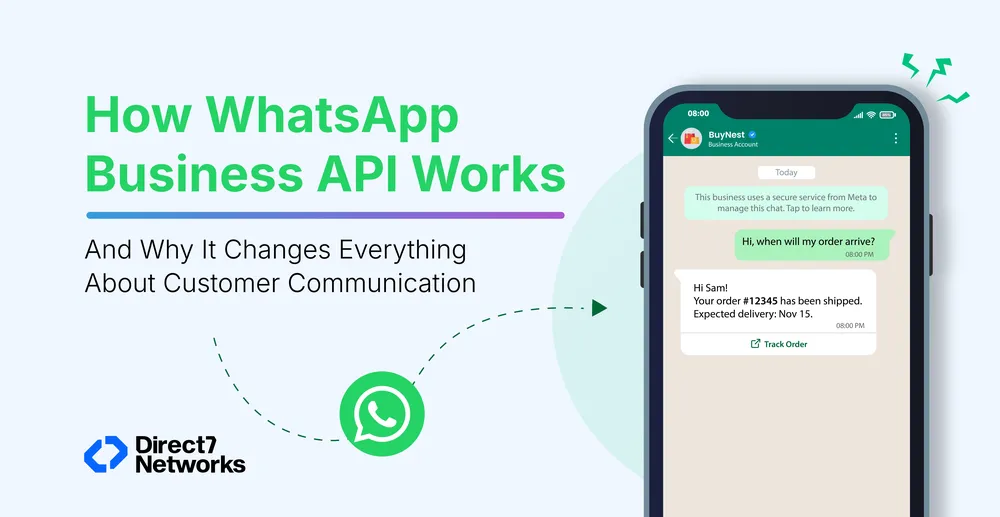
Think of it as a pipeline between your business software and WhatsApp's servers. When a customer messages your business number, that message travels through the API and lands in whatever platform you've connected, your helpdesk, your CRM, your custom-built tool.
When your team (or an automated bot) replies, the message goes back through the same pipeline and appears in the customer's WhatsApp, just like any other message.
The WhatsApp Business Platform allows companies to manage conversations efficiently, automate workflows, and integrate WhatsApp with existing tools like CRMs, e-commerce platforms, and marketing software.
The technical setup involves three layers:
- Meta's Cloud API — the infrastructure hosted by Meta that handles message delivery. The Cloud API enables businesses to programmatically send users a variety of messages, from simple text to rich media and interactive messages.
- A Business Solution Provider (BSP) — an officially approved intermediary that connects your business to the API. D7 Networks, for example, operates as one of these providers, handling the technical integration, compliance, and account management so your team doesn't have to.
- Your platform or software — the interface where your agents actually read and respond to messages, or where automation rules are configured.
The Two Main Types of WhatsApp Messages
Understanding this part helps explain how the API works operationally.
Session Messages
These happen when a customer starts the conversation first.
Example:
A customer messages:
“Where is my order?”
The business can respond freely within a 24-hour customer service window.
This is designed for real-time support conversations.
Template Messages
If the business wants to start the conversation, it must use pre-approved message templates.
Examples include:
- Appointment reminders
- OTP verification codes
- Payment alerts
- Order confirmations
- Shipping updates
WhatsApp reviews these templates to reduce spam and protect user experience.
Businesses that misuse templates often face delivery restrictions or quality penalties.
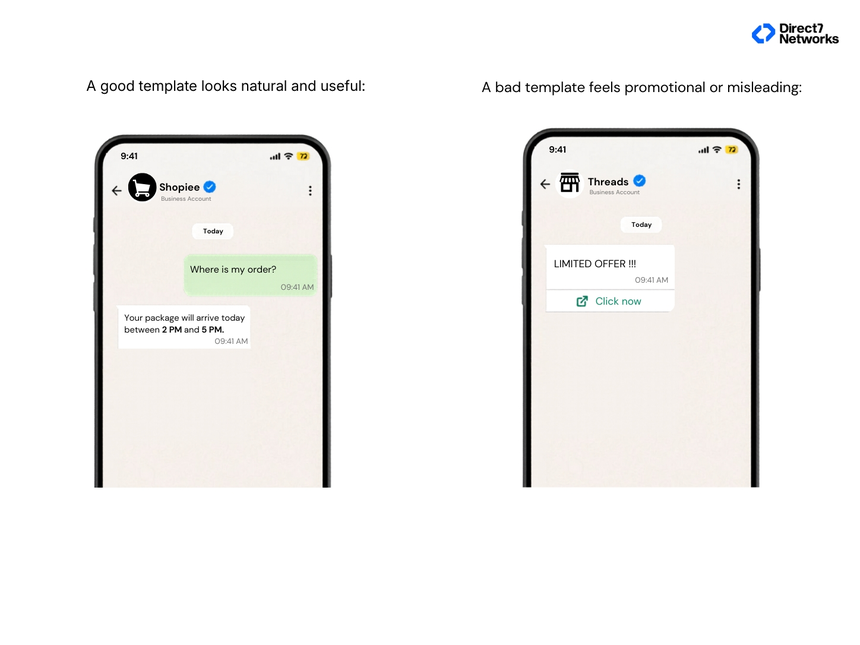
Businesses that misuse templates often face delivery restrictions or quality penalties.
How Automation Works Inside the API
One of the biggest advantages of the WhatsApp Business API is automation.
The API allows businesses to trigger messages based on customer actions or business events.
Here’s a simple workflow framework many companies use:
Trigger → Logic → Message → Action
Trigger
Something happens:
- A payment succeeds
- A support ticket opens
- A customer abandons a cart
- A delivery status changes
Logic
The system decides:
- Which customer should receive the message
- Which template should be used
- Which language should be sent
- Whether escalation is required
Message
The WhatsApp message is automatically delivered.
Action
The customer replies, clicks a button, confirms an appointment, or completes a purchase.
This creates conversational workflows instead of one-way notifications.
Chatbots and Human Agents Work Together
Many people assume WhatsApp automation means replacing human support teams.
In practice, the best systems combine both.
A chatbot handles repetitive requests such as:
- Order status
- Appointment booking
- FAQ responses
- Password reset assistance
When the issue becomes more complex, the conversation transfers to a live agent.
This hybrid model reduces response time while keeping conversations personal.
In industries like healthcare or banking, this balance is especially important because customers often need both speed and trust.
Getting Access: The Setup Path
You can't simply sign up and start sending. The process involves a few key steps:
Business verification, Meta needs to confirm your business is legitimate. You'll need an active Meta Business Manager account and a business website that clearly displays your legal name.
A dedicated phone number, a number not currently linked to any WhatsApp account. Landlines work; most VoIP numbers don't.
BSP selection, unless you're a developer building directly on Meta's Cloud API, you'll go through a BSP. They handle the technical setup, number registration, and often provide the messaging platform you'll operate in.
Template submission, before any outbound campaign runs, your templates are submitted for Meta's review. This typically takes minutes to hours, but poorly structured templates get rejected, causing delays.
The WhatsApp Business App is a simplified version for small businesses, while the WhatsApp Business API allows unlimited multi-agent access, unlimited broadcast messaging, managing multiple numbers in one view, and integration with CRM and e-commerce software.
How Pricing Works Now
Pricing changed significantly in July 2025. Meta replaced conversation-based pricing with per-message pricing, effective July 1, 2025. Under the current model, each delivered template message is billed individually at a rate based on message category and recipient country.
The practical implication: every marketing template you send now has a direct unit cost attached to it. Costs vary significantly by market, sending a marketing message in India costs a fraction of what the same message costs to deliver in Germany or the UK.
The good news for support-heavy teams: utility templates sent inside an active 24-hour customer service window are completely free. If your customer writes to you first, your transactional replies cost nothing.
There's also a useful entry point to know: conversations are free when customers initiate them via Click-to-WhatsApp ads or Facebook Page call-to-action buttons, and the 24-hour customer service window extends to 72 hours in these cases.
The total cost a business pays combines Meta's per-message rates, a BSP's markup or platform fee, and any software subscription for the inbox tool.
Who Actually Benefits Most
The API isn't the right tool for every business. If you're handling 20 conversations a day, the free app will serve you well.
But if any of these are true, the API is worth serious consideration:
- You need multiple team members responding simultaneously from the same number
- You send transactional notifications at volume (order updates, booking confirmations, reminders)
- You want to run WhatsApp marketing campaigns with real targeting and tracking
- Your customer support needs to connect to a ticketing system or CRM
- You're operating across time zones and need automated coverage
Sectors that see the clearest ROI include e-commerce, financial services, healthcare, travel, and logistics, anywhere that requires timely, personalized updates at scale.
Security and Compliance Matter
Businesses handling sensitive customer communication often ask whether the API is secure.
WhatsApp messages are protected with end-to-end encryption. That means message content remains private between the sender and recipient.
The API also includes:
- Verified business profiles
- Role-based access controls
- Audit logging
- Permission management
- Secure authentication systems
Still, businesses must manage compliance carefully, especially in industries dealing with financial or medical information.
A common best practice is simple:
Only send messages customers have agreed to receive.
Consent management matters both for compliance and long-term message deliverability.
Common Mistakes Businesses Make
Many companies treat WhatsApp like bulk email marketing.
That usually fails quickly.
The most effective WhatsApp strategies focus on relevance and timing.
Common mistakes include:
- Sending too many promotional messages
- Using robotic language
- Ignoring response management
- Delaying replies
- Over-automating conversations
Customers expect WhatsApp interactions to feel immediate and human.
A message that sounds conversational often performs better than one that sounds heavily branded.
What a Strong WhatsApp API Setup Looks Like
Successful implementations usually share a few characteristics:
Clear Use Cases
Businesses define specific goals:
- Customer support
- Notifications
- Lead qualification
- Appointment booking
- Payment reminders
CRM Integration
Customer data stays connected across systems.
Smart Automation
Automation handles repetitive tasks without blocking human escalation.
Message Personalization
Messages use customer names, order details, and relevant context naturally.
Performance Monitoring
Teams track:
- Delivery rates
- Read rates
- Response time
- Resolution time
- Customer satisfaction
Without measurement, even good messaging strategies become inconsistent over time.
Where the API Fits in Modern Customer Communication
The WhatsApp Business API is no longer just a support tool.
For many companies, it has become part of operations, sales, onboarding, retention, and customer experience strategy.
The reason is simple: customers already use WhatsApp daily.
Businesses are adapting communication around existing customer behavior instead of forcing users into separate apps or channels.
That shift is changing how brands interact with customers across nearly every industry.
A useful starting point is identifying one high-friction customer interaction, delayed support replies, missed appointment reminders, abandoned carts, or delivery confusion, and improving that single workflow first.
The businesses seeing the best results usually start small, automate carefully, and expand based on actual customer behavior.